One page, three speeds
How to build fast, interactive web UIs by rendering HTML on the server and adding just enough JavaScript, using go-templ, htmx, and Solid. The example is a code review page with drag-to-comment and live updates.
Today, building an interactive web app usually means building a single-page app (SPA). The browser downloads a JavaScript framework such as React, the framework fetches JSON from an API, and it renders every page itself. Server-side rendering shows up as an addition to that setup, the way Next.js runs React Server Components, or as a built-in feature of a large proprietary framework that also handles the frontend, like Google's internal Wiz. On its own, server rendering is mostly associated with blogs and marketing pages.
GitStack's UI is an interactive app, and it is rendered mostly on the server. GitStack hosts code and reviews it, like GitHub. The difference is that instead of one large pull request, a change becomes a stack of small reviews, each built on the one below it and landed (merged) in order, which keeps review manageable at the volume of code that people and AI coding agents produce now. Its code review page needs drag selection and live updates, which makes it the kind of page the standard advice says to build as an SPA, and I have never been fond of that advice.
An SPA moves the whole app into the browser. The server becomes a JSON API whose main client is our own frontend, the data model and its validation get written twice, and every change has to keep the two copies in sync. Rendering moves to the slowest computer involved, which is often a phone, and every page waits for the framework to download and run before it shows anything, including pages that barely change. Smaller libraries such as Preact and Svelte shrink the download, but the browser still does all of that work.
I also wanted one language for the backend and most of the frontend. With server rendering, the parts of the page that come from the server are written in Go, a language I love, and its standard library covers most of what a web server needs.
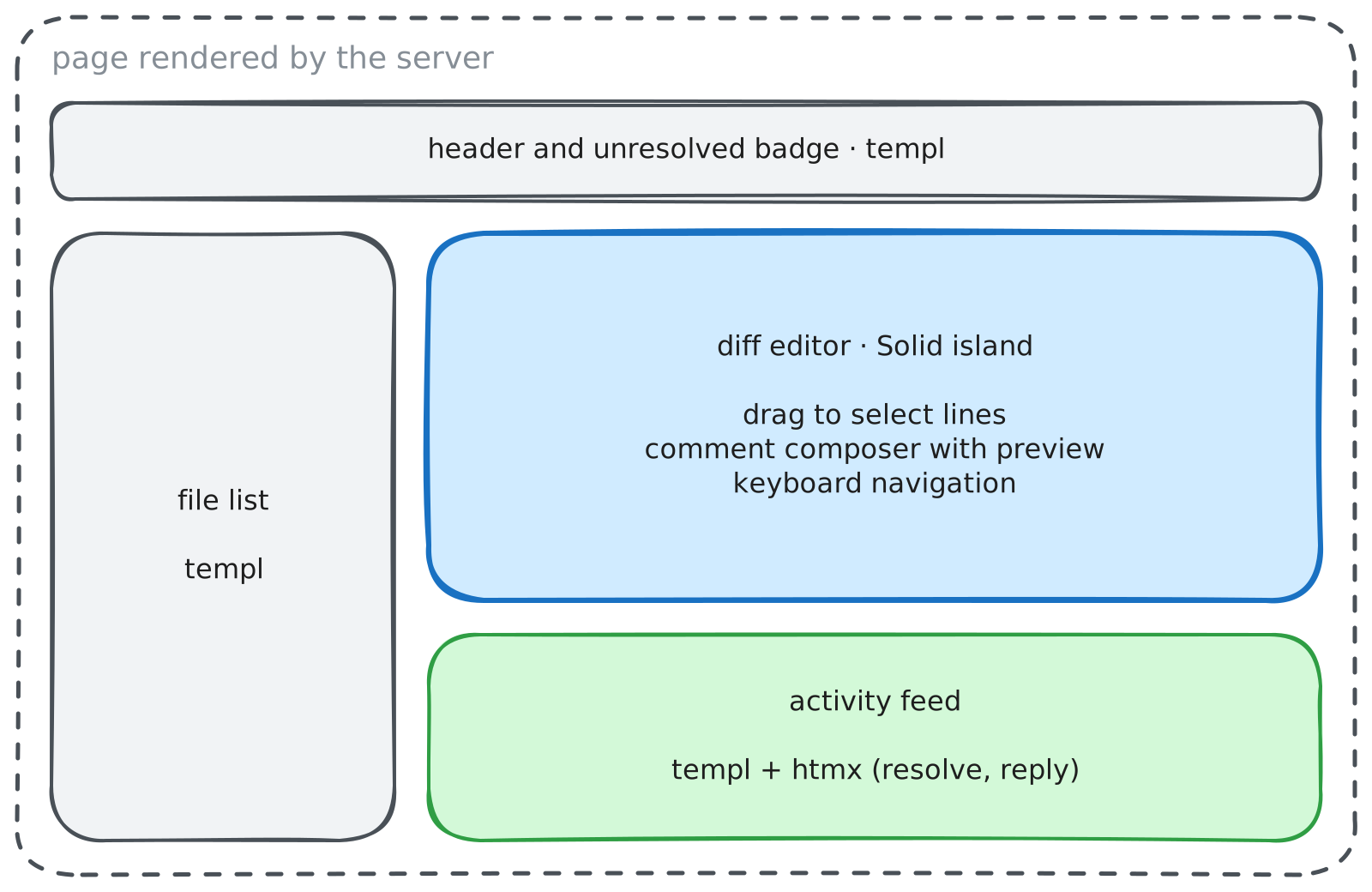
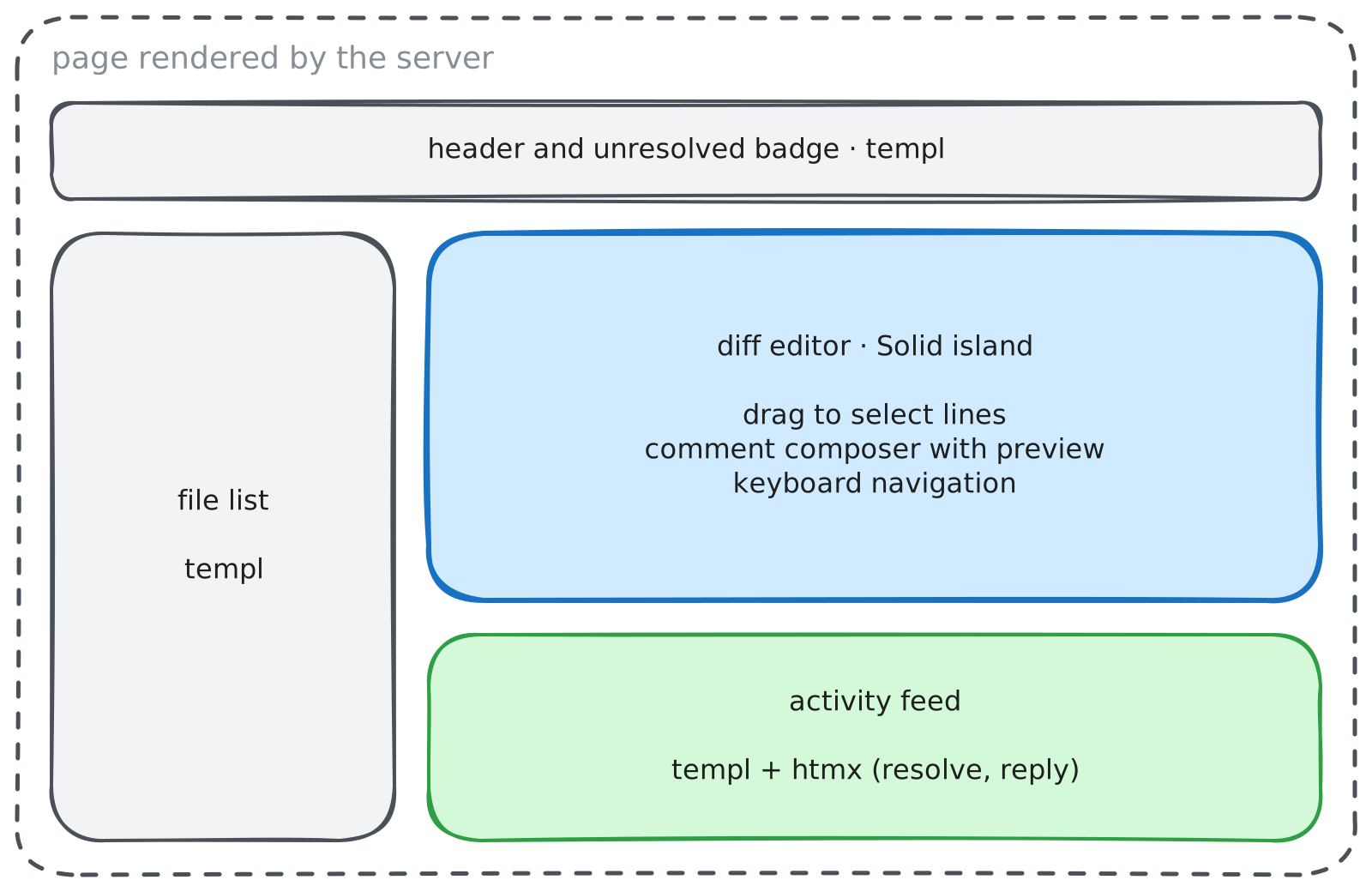
The rest of this post builds a simplified version of that review page, shown below.
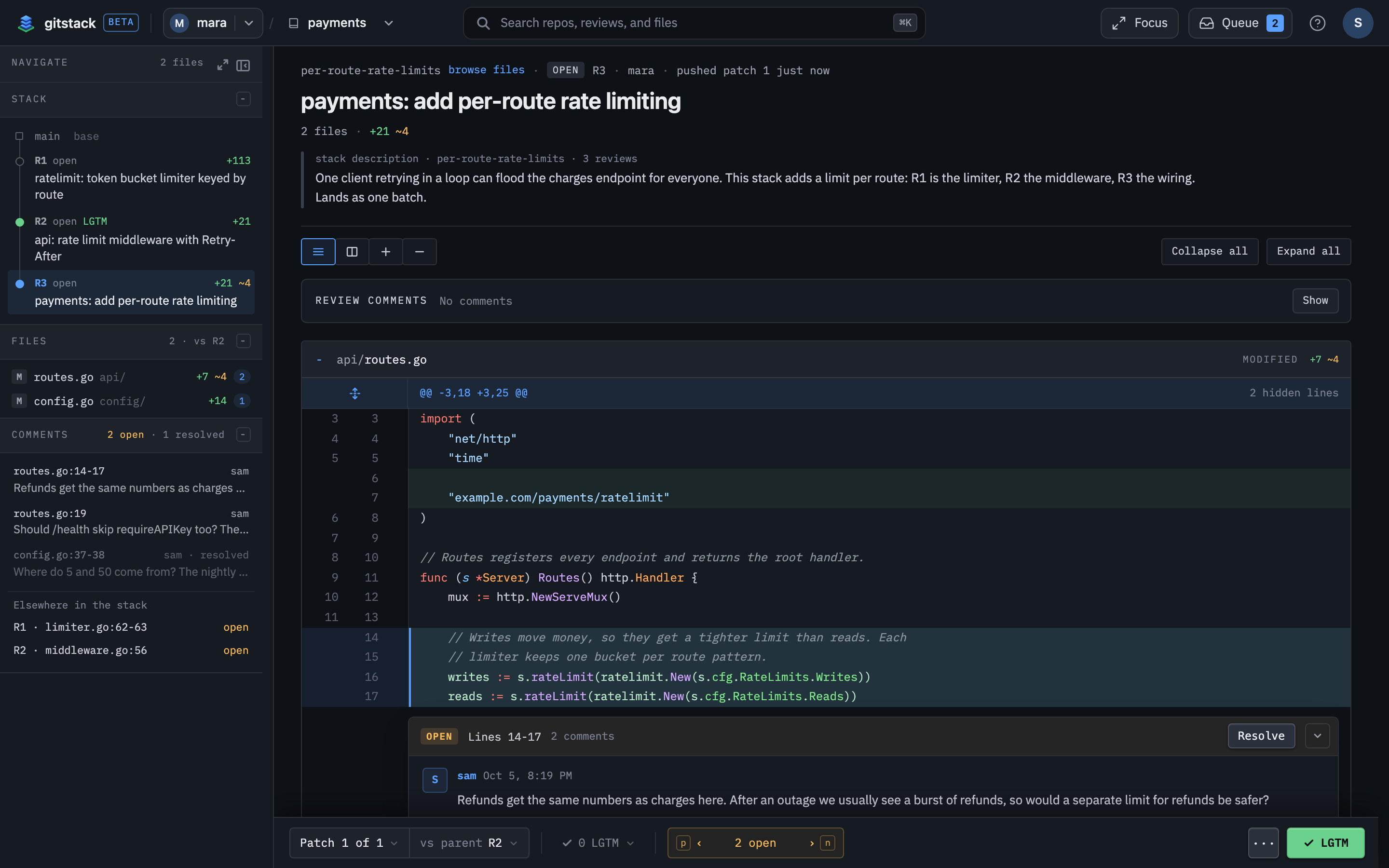
If you have reviewed a pull request on GitHub, this will look familiar. The rail on the left lists the reviews in the stack, the files in this one, and its comment threads. The diff in the middle is where most of the work happens: a user can drag across lines to leave a comment and see a teammate's comment appear without a reload. The bar along the bottom counts the open threads.
The example keeps the core of that page: a sticky header with the review's title and how many threads are still unresolved, a file list on the left, the diff in the middle, and an activity feed below it that lists every thread with Reply and Resolve buttons. Its comment box also previews markdown while you type.
Three speeds#
The parts of this page don't all need the same thing. The file list only changes when the user opens another review. Resolving a thread can wait the tenth of a second it takes the server to answer. Dragging across lines has to keep up with the mouse. I think of these as three speeds, and each one gets its own library.
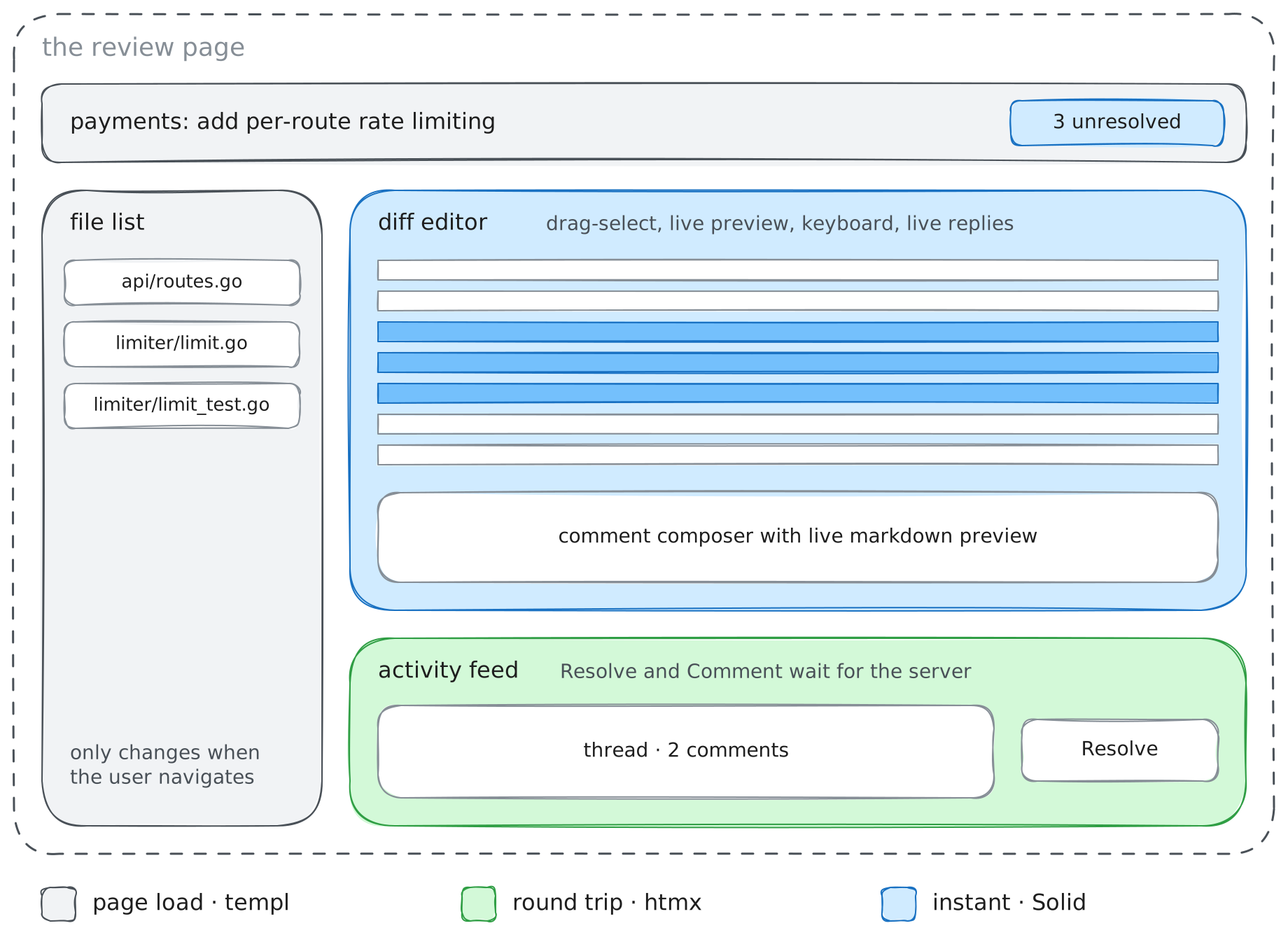
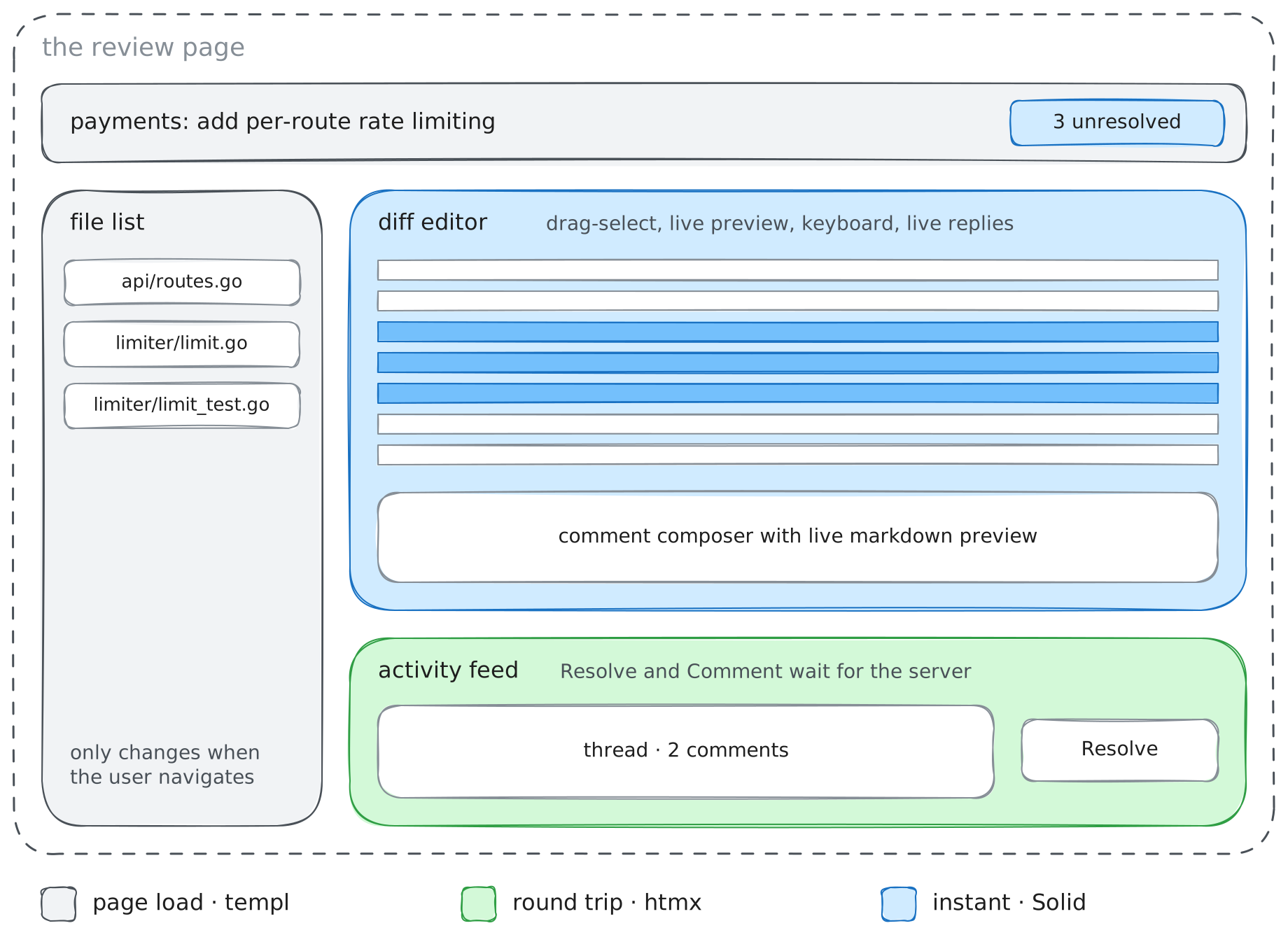
| Speed | What the part has to do | On the review page | Library |
|---|---|---|---|
| Page load | change only when the user navigates | header, file list | go-templ |
| Round trip | update one part of the page after a click, waiting for the server | activity feed, Resolve | htmx |
| Instant | react to every mouse move or keystroke, faster than the server can answer | diff editor, unresolved badge | Solid, plus a shared store for server data |
Everything starts at the slowest speed, because server-rendered HTML is the simplest thing that works. A part moves to a faster speed only when it feels slow where it is, and moving one part doesn't change the others. Two parts change speed in this example. The diff starts as server HTML, moves to htmx so it can load on demand, and ends up in Solid. The unresolved badge starts in htmx and moves to Solid once it has to keep up with the editor.
The pieces of a review#
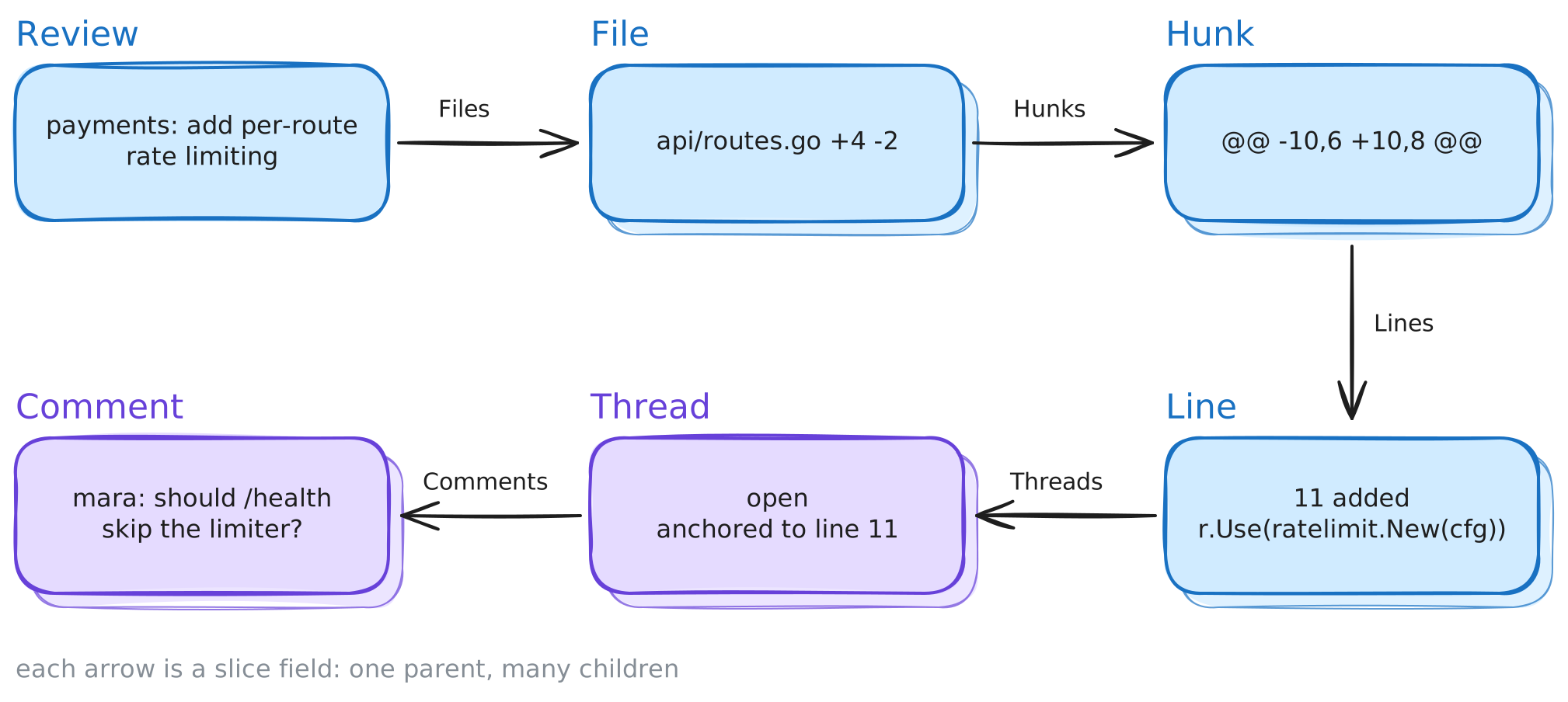
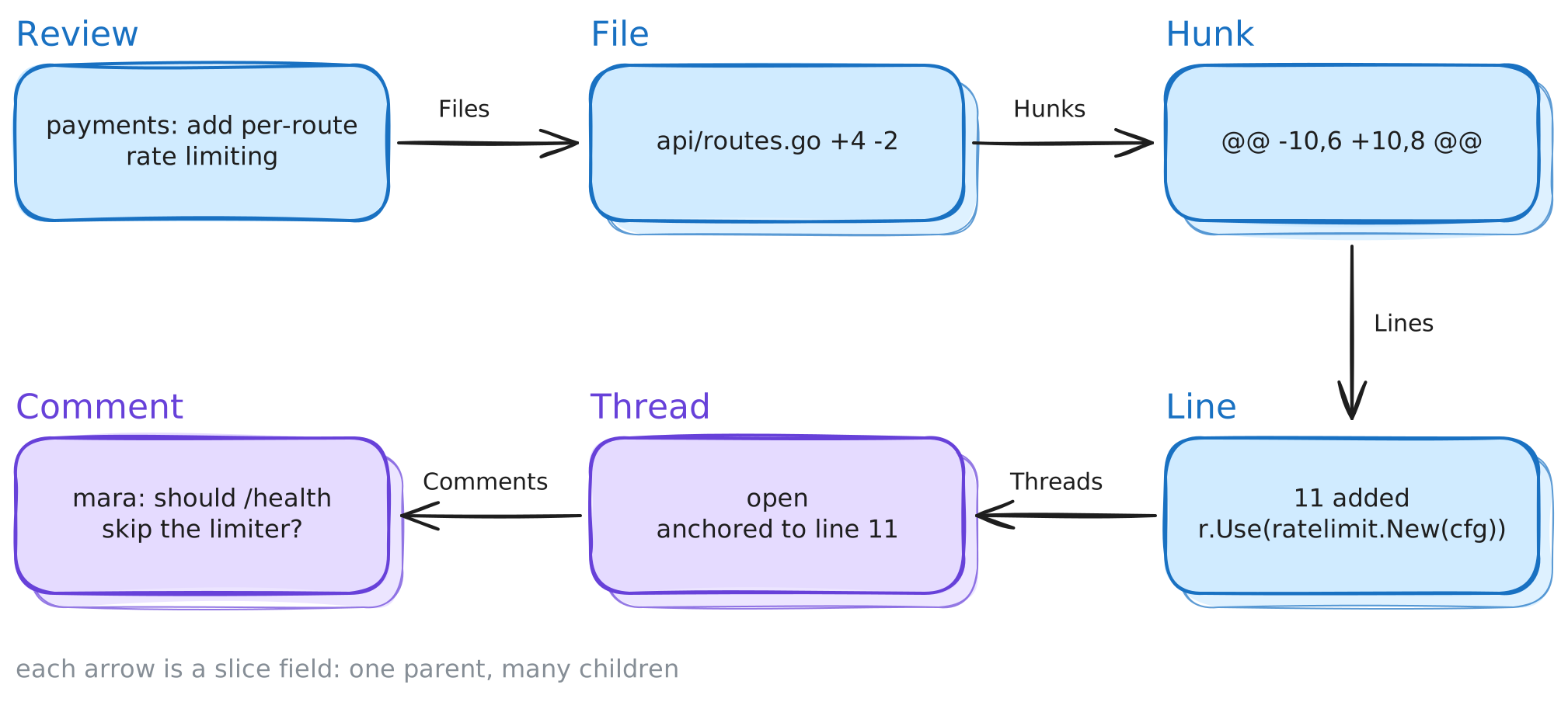
A review contains files, each file contains hunks, each hunk contains lines, and comments hang off individual lines as threads. A hunk is a run of changed lines with a little unchanged context around them.
Page-load speed with templ#
templ is a templating language for server-side rendering in Go. We write
components in .templ files, and templ generate turns each one into a Go
function. Here is a row in the file list.
templ FileRow(f File) {
	<li class="file-row">
		<span>{ f.Path }</span>
		<span class="stats">{ f.Stats() }</span>
	</li>
}
The parameters are ordinary Go parameters, and anything inside { } is a Go
expression, so f.Stats() calls a method that formats the added and deleted
line counts. Because each component compiles to a Go function, templates get
the same checks and building blocks as the rest of the program.
- Compile-time errors. Rename
Pathon the struct and every component that reads it stops compiling, instead of failing when someone loads the page. - All of Go. Loops, conditionals, helper functions, and our own types work inside components.
- Composition. Components call each other with
@, and{ children... }marks where a wrapping component puts its caller's markup, so one layout component wraps every page. - Safe output. templ escapes text and sanitizes URLs by default.
The page itself is a few components stacked together.
templ ReviewPage(r Review) {
	@Layout(r.Title) {
		<header class="topbar">
			<h1>{ r.Title }</h1>
			@UnresolvedBadge(r.UnresolvedCount(), false)
		</header>
		<ul class="files">
			for _, f := range r.Files {
				@FileRow(f)
			}
		</ul>
		<main class="diffs">
			for _, f := range r.Files {
				@FileDiff(f)
			}
		</main>
	}
}
Serving it is a standard Go handler. We load the data and call Render with
the response writer.
func (s *Server) review(w http.ResponseWriter, r *http.Request) {
	rev := s.store.Review(r.PathValue("id"))
	components.ReviewPage(rev).Render(r.Context(), w)
}
The review arrives in one response, works with JavaScript turned off, and the templates read the Go structs directly, so there is no API layer or second copy of the data model. For parts of the page that only change on navigation, this is enough.
Changing anything still reloads the whole page. If the user scrolls deep into a long diff and clicks Resolve on a thread, the server sends back a new copy of the entire page and the user loses their place. A review with many large files is also slow to load, because every diff renders up front. With htmx, we can ask the server to render one thread, or one file, when it is needed, and leave the rest of the page alone.
Round-trip speed with htmx#
htmx lets any element send an HTTP request and place the HTML that comes back anywhere on the page. It is about 16 kB gzipped with no dependencies, and it works through a handful of attributes.
| Attribute | Question it answers | Default |
|---|---|---|
hx-get, hx-post |
what to request | |
hx-target |
where the response goes, as a CSS selector | the element itself |
hx-swap |
how it goes in | innerHTML (replace the target's children) |
hx-trigger |
when to send the request | click, or submit for a form |
hx-get, hx-posthx-targethx-swapinnerHTML (replace the target's children)hx-triggerLoading a diff on demand#
Instead of calling FileDiff for every file,
ReviewPage now renders an empty <section id="diff-…"> per file, and the
file row gets two attributes so a click loads that one diff.
templ FileRow(f File) {
	<li class="file-row"
		hx-get={ "/diff/" + f.ID }
		hx-target={ "#diff-" + f.ID }>
		<span>{ f.Path }</span>
		<span class="stats">{ f.Stats() }</span>
	</li>
}
When the user clicks a row, htmx sends GET /diff/<id> and puts the response
inside the matching section. The handler renders the same FileDiff component
the full page already used.
func (s *Server) diff(w http.ResponseWriter, r *http.Request) {
	f := s.store.File(r.PathValue("id"))
	components.FileDiff(f).Render(r.Context(), w)
}
In a single-page app, this lazy load would need a JSON endpoint plus client-side types and rendering code. Here the handler calls a function that already existed, and the app still has one way to render a diff. (That changes when the diff moves to Solid, and we will look at what that move costs when we get there.)
Resolving a thread in place#
For a change to data, the handler does the work and renders the new state of whatever changed. The Resolve button posts and replaces its own thread card.
<div id={ "thread-" + t.ID } class="thread">
	…
	<button hx-post={ "/threads/" + t.ID + "/resolve" }
		hx-target={ "#thread-" + t.ID }
		hx-swap="outerHTML">Resolve</button>
</div>
outerHTML replaces the whole card, including its outer div, with the
response. Other swap styles cover other changes, such as beforeend to append
a new comment to a thread.
The header's unresolved count should drop too, but the button's target is the
card. htmx handles this with hx-swap-oob="true". An element in the response
carrying that attribute replaces the element with the same id anywhere on the
page, and the rest of the response goes to the target as usual. The badge
component takes an oob flag that adds the attribute, which is the false in
ReviewPage above. So the resolve handler writes both.
func (s *Server) resolve(w http.ResponseWriter, r *http.Request) {
	t := s.store.Resolve(r.PathValue("id"))
	components.ThreadCard(t).Render(r.Context(), w)
	rev := s.store.Review(t.ReviewID)
	components.UnresolvedBadge(rev.UnresolvedCount(), true).Render(r.Context(), w)
}
One request updates both places. In the activity feed, the resolved thread collapses in place and the count in the header drops without a page reload.
GitStack also uses htmx for navigation. The page body carries
hx-boost="true", which turns every ordinary link into an htmx request: the
server renders the next page as usual, and htmx swaps it into the body
without reloading the scripts and styles that are already running. Switching
reviews in GitStack's stack rail works this way.
Reacting to htmx responses#
Sometimes the page should do something after an htmx request finishes, like
clearing a comment form once the comment posts. htmx fires DOM events at each
step of a request, so we listen for one of them. A single listener on
document covers every form marked with a data-reset attribute.
document.addEventListener("htmx:afterRequest", (evt) => {
	const el = evt.detail.elt;
	if (evt.detail.successful && el.matches("form[data-reset]")) el.reset();
});
htmx:afterRequest fires on the element that made the request and bubbles up
to the document. Keeping this code in a static file, rather than in inline
attributes, also keeps the page compatible with a strict Content Security
Policy, covered later.
Where htmx stops#
htmx covers most of the interactivity a typical app needs, but the diff editor needs interactions a network round trip cannot serve well. It has to highlight a range of lines during a drag, preview a comment's markdown on every keystroke, move between hunks on a key press, show a new comment before the server answers, and show a teammate's comment as soon as they post it. Sending each of those to the server would make the page feel slow.
This part of the page needs client-side state, but I don't want to force a large framework onto the simpler parts of the page because this one region needs it. We need something that gives one region its own state and leaves the rest alone.
Instant speed with Solid#
An island is one client-side component mounted into one element of a page that is otherwise server-rendered HTML. It needs no router or app shell. The header, file list, and activity feed are still the templ and htmx code from the last two sections.
Moving the diff here brings back the costs from the start of this post. The island needs a JSON endpoint, TypeScript types that mirror the Go structs, and a second renderer for the diff, this time in TSX. We accept them for this one region because a round trip is too slow for a drag. The header, the file list, and the activity feed stay server HTML, while in an SPA they would carry these costs too.
Why Solid#
- Fine-grained updates. Solid tracks which parts of the page read which values. Typing in the comment box updates the character counter and the preview, and none of the thousands of diff lines around them. React re-runs a component on every change and compares the result against an in-memory copy of the page (the virtual DOM) to find what changed. On a large diff that means memoizing, marking by hand which parts React can skip, to keep typing smooth.
- Small runtime. In this example, Solid plus the store and the live-update code come to under 6 kB gzipped. React and React DOM are about 45 kB gzipped before any app code.
- Mounts anywhere.
render(component, element)attaches a component to one element and returns a function that removes it. - Familiar syntax. Solid uses JSX, so its code looks like React code.
React can run islands too, and the pattern works with any library that mounts into an element. I chose Solid because this page is mostly static HTML with one large interactive region, which is where its fine-grained updates and small runtime help.
Handing the island its data#
The server renders an empty mount point next to the island's props serialized as JSON, and a short script mounts the component there.
templ WidgetMount(name, id string, props any) {
	<div data-widget={ name } data-widget-id={ id }></div>
	@templ.JSONScript("props-"+id, props)
}
templ.JSONScript writes the props inside a <script type="application/json">
tag, which browsers treat as data and never execute. On the TypeScript side we
declare interfaces that mirror the Go structs (a generator like
tygo can write them for us). A bootstrap
script then finds each mount point, imports that island's code, and mounts it.
// static/bootstrap.js
for (const el of document.querySelectorAll("[data-widget]")) {
	const props = JSON.parse(
		document.getElementById("props-" + el.dataset.widgetId).textContent);
	const mod = await import(`/static/dist/${el.dataset.widget}.js`);
	mod.mount(el, props);
}
The import() is dynamic, so a page without islands downloads no island code.
Every island's mount is the single line return render(() => <DiffEditor {...props} />, el).
A short Solid primer#
Solid is built on signals, which are values that keep track of which parts of
the page read them. createSignal returns a getter and a setter.
function Composer() {
	const [body, setBody] = createSignal("");
	return (
		<div>
			<textarea onInput={(e) => setBody(e.currentTarget.value)} />
			<span>{body().length}/2000</span>
			<Preview markdown={body()} />
		</div>
	);
}
Every keystroke calls setBody. The counter and the preview both call
body(), so Solid updates only those two elements. There is no
virtual DOM, and the component function itself runs only once. Anything that
should update reads the signal where it is used, in the JSX or in a small
function like the badge's count later on, instead of copying the value into a
variable at the top.
Building the editor#
The editor's local state is a handful of signals. Drag selection is one signal holding the selected range.
const [sel, setSel] = createSignal<Sel | null>(null);
let dragging = false;

const startDrag = (file: string, hunk: number, line: number) => {
	dragging = true;
	setSel({ file, hunk, from: line, to: line });
};
const extendDrag = (file: string, hunk: number, line: number) => {
	if (dragging) setSel((s) => (s?.file === file && s.hunk === hunk ? { ...s, to: line } : s));
};

// in the JSX, for each line:
<div
	classList={{ line: true, selected: inSel(f.ID, hi, li) }}
	onMouseDown={() => startDrag(f.ID, hi, li)}
	onMouseEnter={() => extendDrag(f.ID, hi, li)}>
Each line's selected class reads sel() through inSel, so only lines whose
state changed update as the mouse moves. Releasing the mouse opens the
composer under the selection. With the network tab open, dragging, typing, and
moving between hunks send no requests.
Server data and the store#
An island holds two kinds of state. Browser state, like the selection or the text in the composer, exists only in this tab, and signals hold it. Server state, like the review and its comments, belongs to the server, and the browser's copy goes stale as soon as someone else changes something. The island never edits that copy directly. It replaces it with whatever the server sends and keeps unconfirmed changes separate.
Say Sam and Mara both have the review open. Sam posts "should /health skip the limiter?" while Mara resolves a different thread. Three things should happen on Sam's page.
- Sam's comment should appear when Sam presses Comment, before the server answers.
- Mara's resolve should show up without a reload.
- The unresolved count in the header and the threads in the diff should agree.
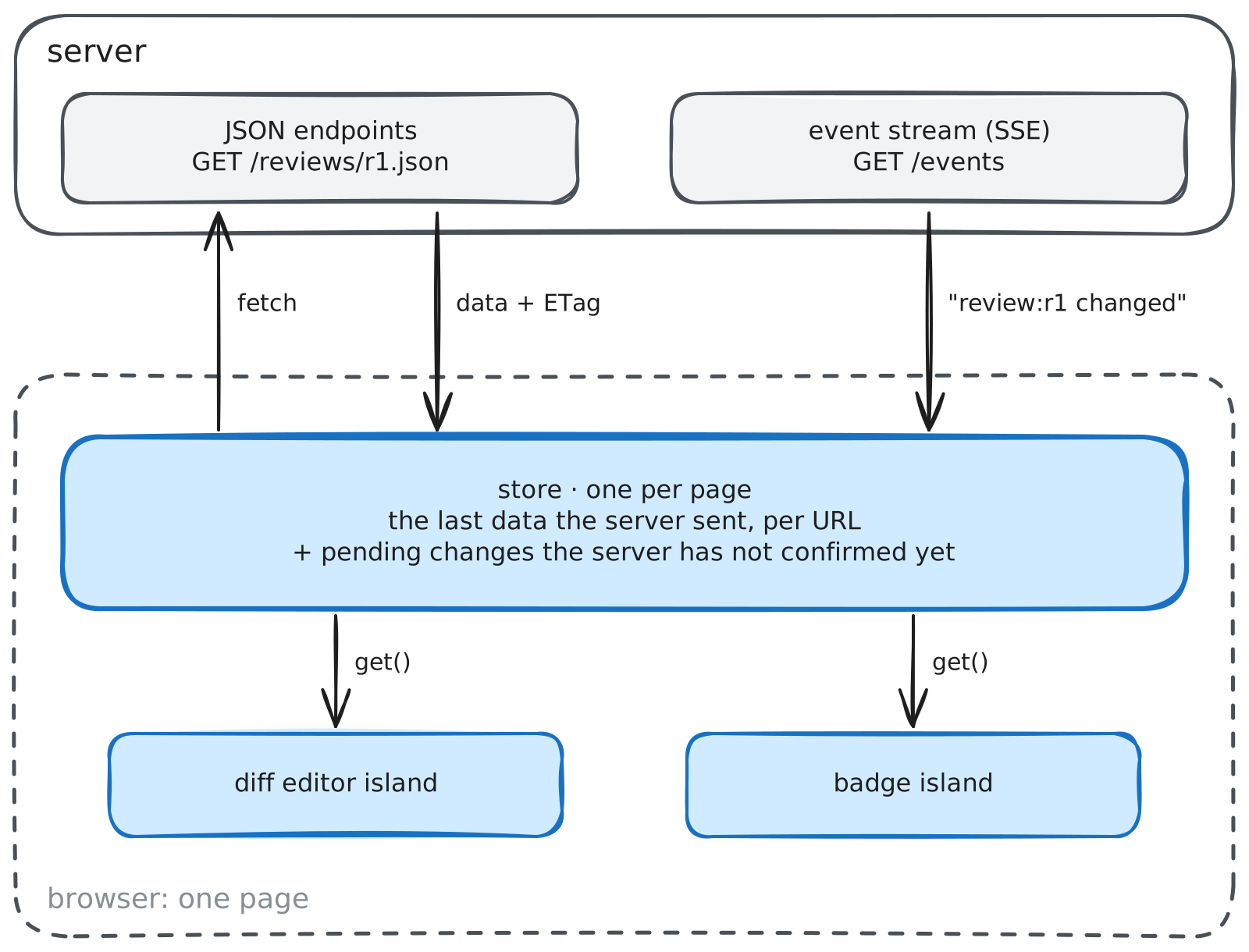
Handling that separately in each island would mean each one fetching, caching, and updating on its own and drifting apart. Instead, one store in the browser keeps the last data the server sent for each URL, shared by every island on the page. The store is an ordinary module, and every island that imports it gets the same copy, as long as the islands are built together in one Vite build so they load the same copy of Solid and the store.
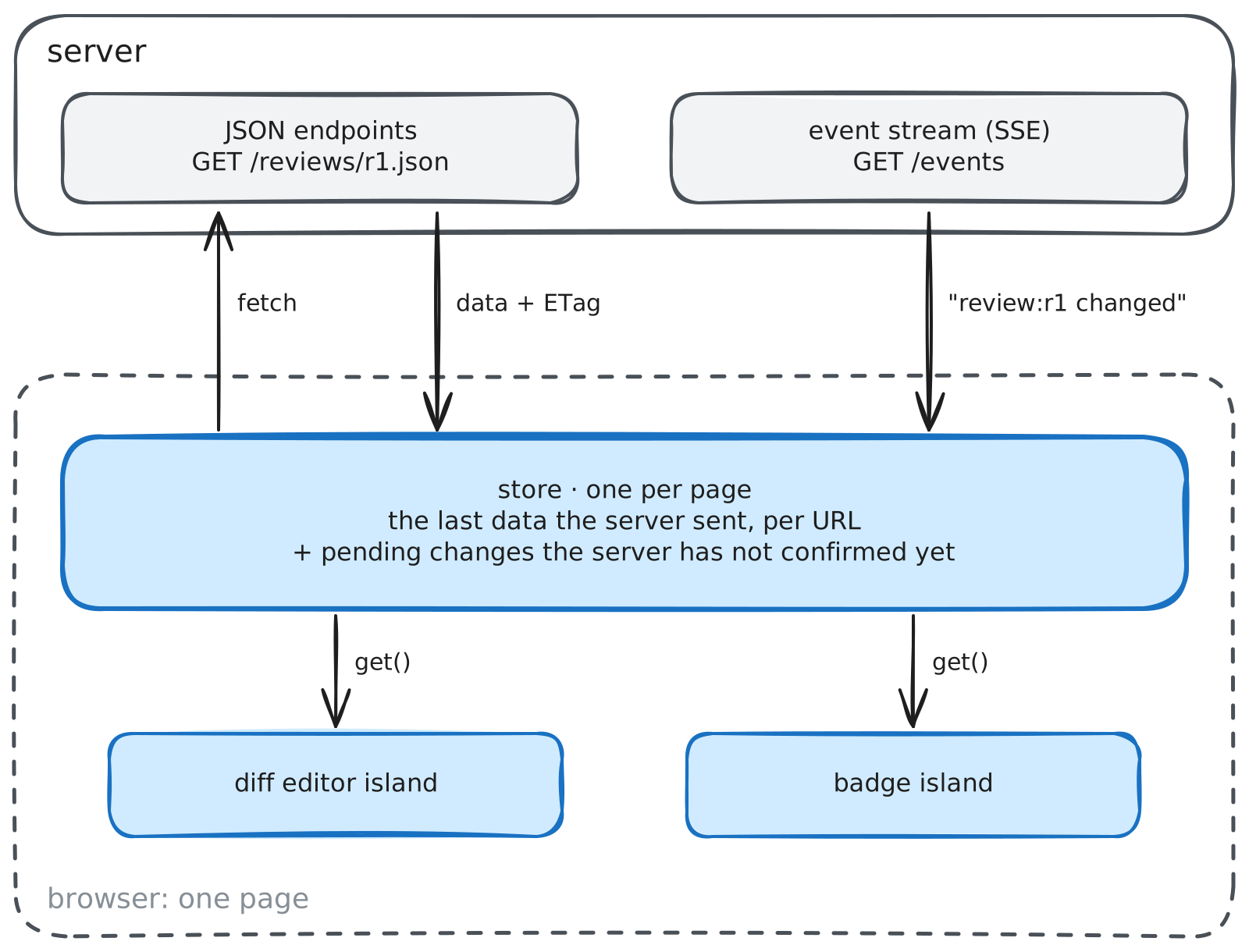
It has two operations.
interface Store {
	// Read a URL's data, starting from what the server rendered. Stays current
	// while a component reads it, and stops listening when the last one unmounts.
	use<T>(url: string, initial?: T): () => T | undefined;

	// Show a change right away, send the request, then keep what the server
	// returns. If the request fails, the change disappears and the error is thrown.
	mutate<T>(url: string, m: { optimistic?: (d: T) => T; send: () => Promise<Response> }): Promise<void>;
}Reading#
use returns a getter, and a component that calls it updates whenever that
URL's data changes. The diff editor passes the props the server rendered as the
starting data, so the first frame needs no request.
const url = `/reviews/${props.ID}.json`;
const review = store.use<Review>(url, props);

<For each={review()?.Files}>{(f) => <FileSection file={f} />}</For>Changing#
When Sam presses Comment, the island calls mutate. The comment appears
immediately in a lighter "sending" style while send posts it. Showing a
change before the server confirms it is called an optimistic update.
try {
	await store.mutate<Review>(url, {
		optimistic: (r) => withComment(r, line, text),
		send: () =>
			post(`/threads/${threadID}/comments`, new URLSearchParams({ body: text })),
	});
} catch {
	setError("Could not post the comment. It was not saved.");
}
post is a small wrapper around fetch that asks for JSON and adds the CSRF
token from the security section. The endpoint answers with the updated review as JSON. The store saves it and
removes the pending change in one update, so the comment doesn't appear twice
or disappear for a moment. If the request fails, the pending change disappears and the island
shows an error.
The store keeps the server's data and the pending changes separately, and the getter combines them on every read.
return () => {
	entry.track(); // tell Solid who is reading
	let data = entry.serverData;
	for (const change of entry.pending) data = change(data);
	return data;
};
Keeping them separate handles the Sam and Mara case. If Mara's resolve arrives while Sam's request is still in flight, the server data underneath is replaced with a version that has her resolve and not yet Sam's comment, and the getter still draws the pending comment on top, so it stays on screen.
Hearing about other people's changes#
Server-Sent Events let the server push a message to the browser when
something changes. The browser opens one ordinary HTTP request, and the
server keeps it open and writes a short message per change. The browser's
built-in EventSource reconnects on its own if the connection drops. Here a
goroutine per connection makes the server side short.
func (h *Hub) events(w http.ResponseWriter, r *http.Request) {
	w.Header().Set("Content-Type", "text/event-stream")
	ch := h.subscribe()
	defer h.unsubscribe(ch)
	for {
		select {
		case <-r.Context().Done():
			return
		case url := <-ch: // e.g. "/reviews/r1.json"
			fmt.Fprintf(w, "event: change\ndata: %q\n\n", url)
			w.(http.Flusher).Flush()
		}
	}
}
Every handler that changes a review publishes that review's URL, and while a component reads a URL, the store refetches it when an event names it. So when Mara resolves her thread, Sam's editor shows it resolved, and when Sam's comment saves, it appears on Mara's page.
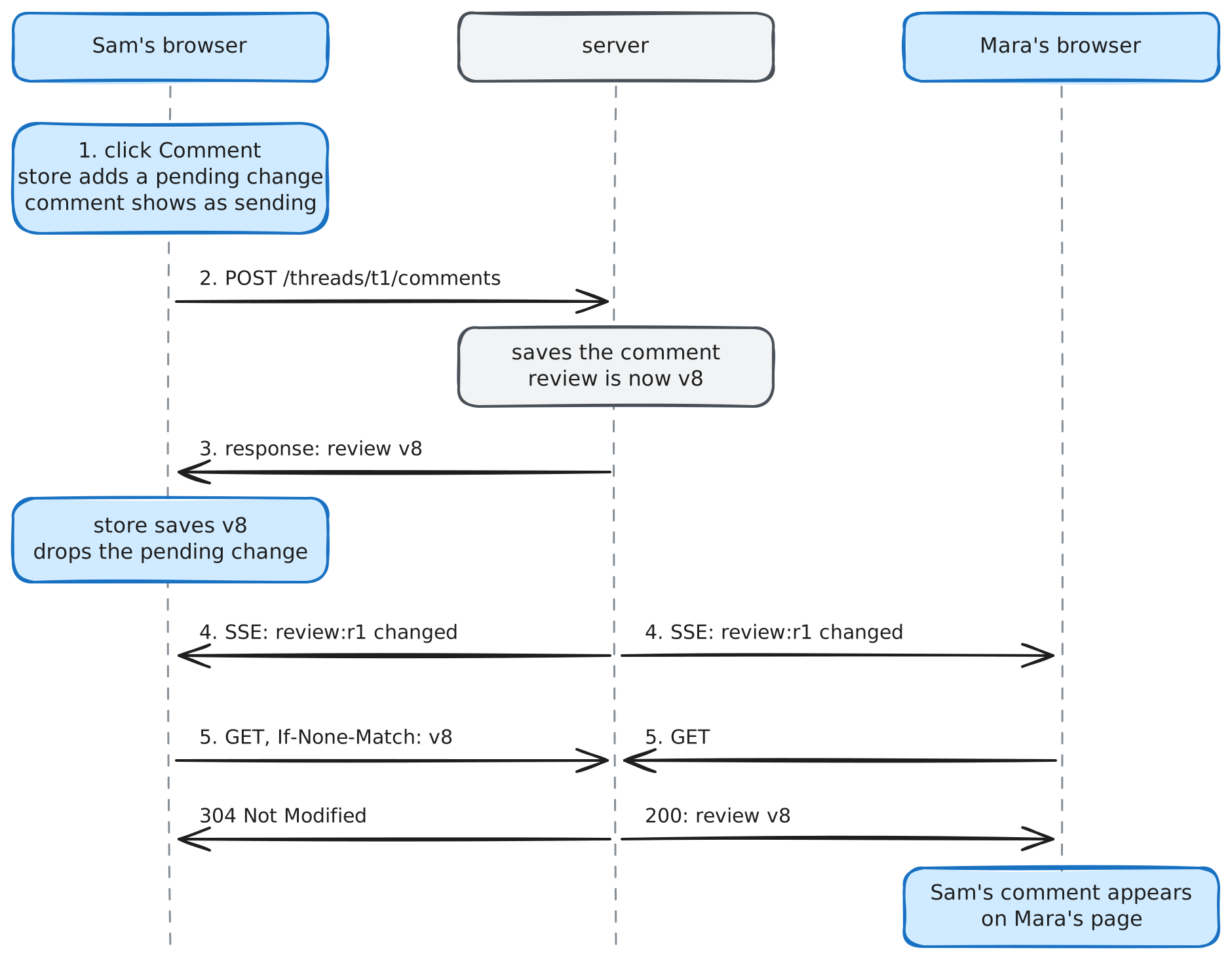
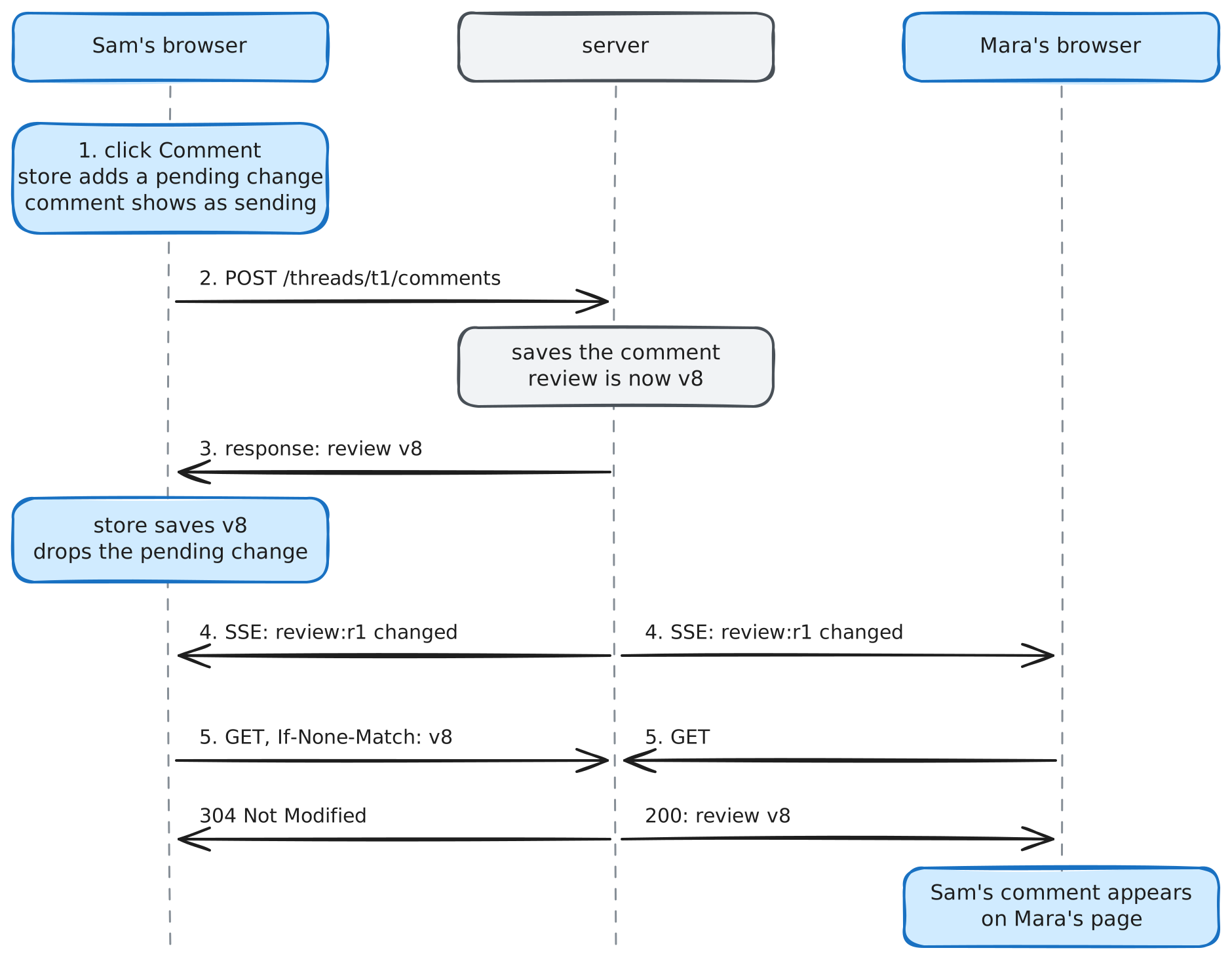
Sam's browser hears about Sam's own comment too, and refetches a review it
already has. ETags make that cheap. The server labels each response with a
version, the store sends the label back in If-None-Match, and if nothing
changed the server answers 304 Not Modified with an empty body. The store
also ignores a refetch that started before newer data arrived, so a slow
response can't overwrite newer data.
A second island on the same store#
Until now the badge was server HTML, updated by the resolve handler's out-of-band swap, so it knew nothing about comments posted from the editor or about Mara's changes. Its count and the editor's threads could disagree. The header badge becomes a second, small island that reads the same review.
function UnresolvedBadge(p: BadgeProps) {
	// same URL as the diff editor, so both islands share one copy
	const review = store.use<Review>(`/reviews/${p.ReviewID}.json`);
	// before the store has data, show the count the server rendered
	const count = () => {
		const r = review();
		return r ? unresolvedThreads(r) : p.Count;
	};
	return <span id="unresolved-badge">{count()} unresolved</span>;
}
The server still renders the badge inside the mount point, so the count is right before any JavaScript runs. When Sam's comment opens a new thread, the badge ticks up at the same moment the comment appears, because it reads the same data with the same pending change applied. The two islands share only the store and don't import each other. The resolve handler also stops writing the out-of-band badge, since its change event reaches the badge like any other.
The activity feed is still server HTML, so in this example it catches up on the next page load. Keeping it live would mean having htmx refetch it when the same change event arrives, or moving it onto the store as a third island.
Security#
The stack relies on two defenses, CSRF tokens and a strict Content Security Policy.
Unless a cookie is restricted with SameSite, the browser sends it with every
request to our domain, including requests another site triggers, so a hostile
page could post to /threads/t1/resolve with the user's session. SameSite=Lax
blocks the common cases, and a per-session token covers the rest. The layout
puts the token in a <meta> tag, a listener adds it to every htmx request, the
islands' post helper adds it to theirs, and middleware rejects writes without
it.
document.addEventListener("htmx:configRequest", (evt) => {
	evt.detail.headers["X-CSRF-Token"] =
		document.querySelector('meta[name="csrf-token"]').content;
});
A Content Security Policy tells the browser which scripts may run, so if a script is injected into a comment, the browser refuses to run it.
Content-Security-Policy: default-src 'self'; script-src 'self' 'nonce-…'; object-src 'none'; base-uri 'self'; frame-ancestors 'none'The stack works under this policy with one configuration change, described
below. htmx, the islands, and small
scripts load as files from our own origin, behavior lives in document
listeners instead of inline handlers (so no hx-on), and island props are
inert JSON. When we need an inline script, it carries a nonce, a random value
the server generates for each response and lists in the policy, and
templ.WithNonce(ctx, nonce) makes templ add it for us. One gotcha is that
htmx injects a small <style> for its loading indicators, which default-src 'self' blocks, so we turn it off with
<meta name="htmx-config" content='{"includeIndicatorStyles":false}'/> and put
those rules in our stylesheet.
Testing#
Each speed is tested on its own. A templ component is a function, so a Go test renders it into a buffer. Instead of comparing strings, we parse the HTML with goquery and check it with CSS selectors, so whitespace and attribute order don't break the test.
var buf bytes.Buffer
f := model.File{ID: "f1", Path: "api/routes.go", Added: 4, Deleted: 2}
if err := components.FileRow(f).Render(ctx, &buf); err != nil {
	t.Fatal(err)
}
doc, _ := goquery.NewDocumentFromReader(&buf)
if got := doc.Find("li.file-row .stats").Text(); got != "+4 -2" {
	t.Errorf("stats = %q, want %q", got, "+4 -2")
}
if got := doc.Find("li.file-row").AttrOr("hx-get", ""); got != "/diff/f1" {
	t.Errorf("hx-get = %q, want %q", got, "/diff/f1")
}
Islands render under Vitest with @solidjs/testing-library, with no browser.
The store takes its event stream and fetch function as options, so a test can
fake Mara's change arriving while Sam's comment is still sending and check the
comment stays visible. Playwright covers the paths that cross all three
speeds, like dragging across lines to open the composer.
Performance and production#
Most pages ship no JavaScript of their own. The review page ships htmx (about 16 kB gzipped) and about 11 kB of island code (the 6 kB shared runtime plus the two islands), loaded only where it is used.
- Load island code early, and only where needed. The bootstrap imports an
island only when the page has one, and a
<link rel="modulepreload">per island lets the browser start downloading while it parses the HTML. - Minify and fingerprint. Vite minifies the islands and puts a content hash
in each file name, and writes a manifest the server uses to render the right
URL. Hand-written scripts get a
?v=hash. Because a URL changes whenever its content does, these files can be cached withCache-Control: public, max-age=31536000, immutable. - Compress. A gzip middleware compresses HTML, JSON, JavaScript, and CSS, and skips the SSE stream, because buffering would hold events back.
- Source maps.
build.sourcemap: "hidden"writes maps for an error tracker without linking them from the bundles.
Conclusion#
For each part of a page, ask how fast it has to react. Start it as server HTML, move it to htmx when a full reload gets in the way, and move it into an island only when a round trip is too slow. Most of the page stays server HTML, and JavaScript goes only where it is needed. I am really proud of how this has worked out for GitStack's UI, and it still has room to improve. For more on the three libraries, see the templ guide, htmx.org, and solidjs.com.
If you want to see the pattern in a real app, try GitStack. It replaces one big pull request with a stack of small reviews that land in order, so each review is small enough to read carefully, whether an agent or a person wrote the code. A repository you import from GitHub stays connected as a mirror, so issues, comments, and CI checks flow both ways. The getting started guide walks you from installation to your first landed stack.
Cheers!