docs

changelog

RSS

gs 0.14.0gs 0.15.04 changes
WebCLI 0.14.0

Approve CI on a contributor's lane

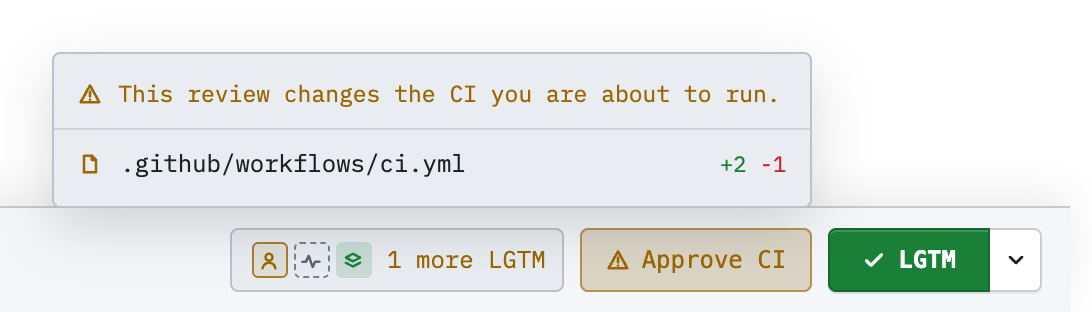
Approve CI runs CI on one version of a lane review and lands nothing; a new push needs a new approval, and Cancel CI (gs review ci --cancel) takes it back. When the change edits files CI runs, the button turns amber and lists them, and gs refuses without --allow-ci-changes.

The review bar on a contributor's review that edits its GitHub workflow. The Approve CI button is amber, and hovering it opens a card that reads This review changes the CI you are about to run, listing .github/workflows/ci.yml with 2 lines added and 1 removed.

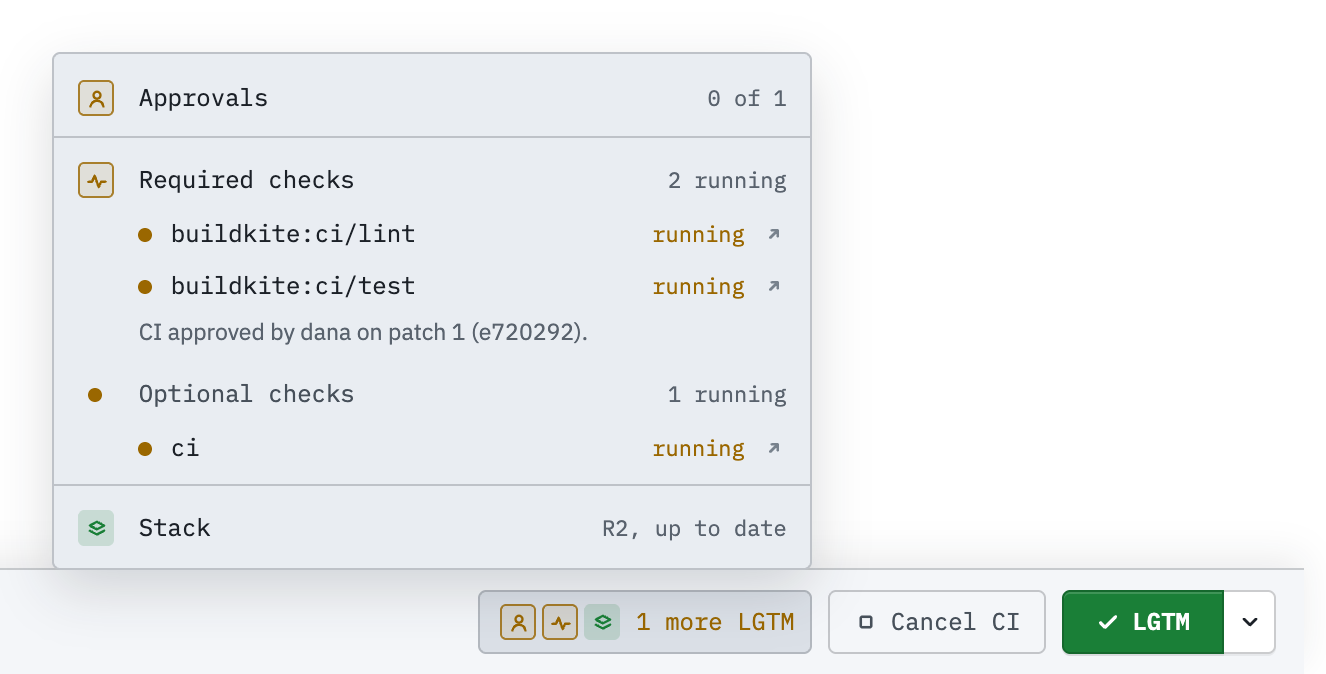
The review bar after a maintainer approved CI: the button now reads Cancel CI. The open status popover shows approvals 0 of 1, the required checks buildkite:ci/lint and buildkite:ci/test running, and the line CI approved by dana on patch 1 (e720292).

WebCLI 0.15.0

GitStack issues

Issues filed on GitStack are numbered per repo (I1, I2) and live with the code. A repo linked to GitHub shows both trackers in one Issues list, newest update first, with a chip and a filter for each source. Anyone who can read a public repo may file and comment; people with write label, assign and close. gs review create --fixes I12 closes the issue when the whole stack lands, and gs issue lists, files and edits issues without a clone. Owners rename prefixes and pick the default tracker in the repo's settings, and [issues] require_fixes in .gitstack/policy.toml holds a land until the stack names an issue.

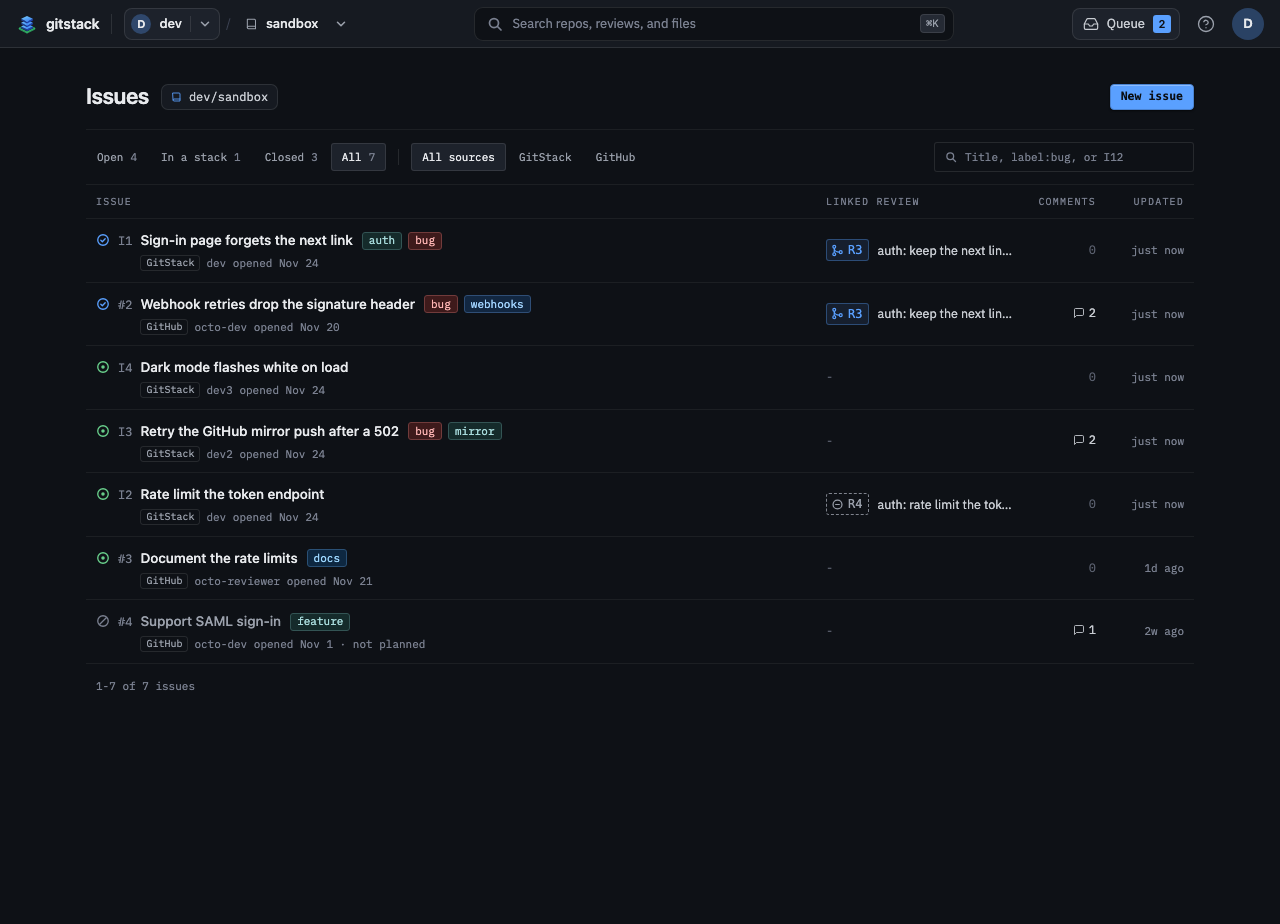
The Issues list of dev/sandbox with every source: GitStack issues I1 to I4 and GitHub issues #2 to #4, each with a GitStack or GitHub chip under its title. I1 and #2 are closed by the landed review R3, and I2 sits in the open review R4.

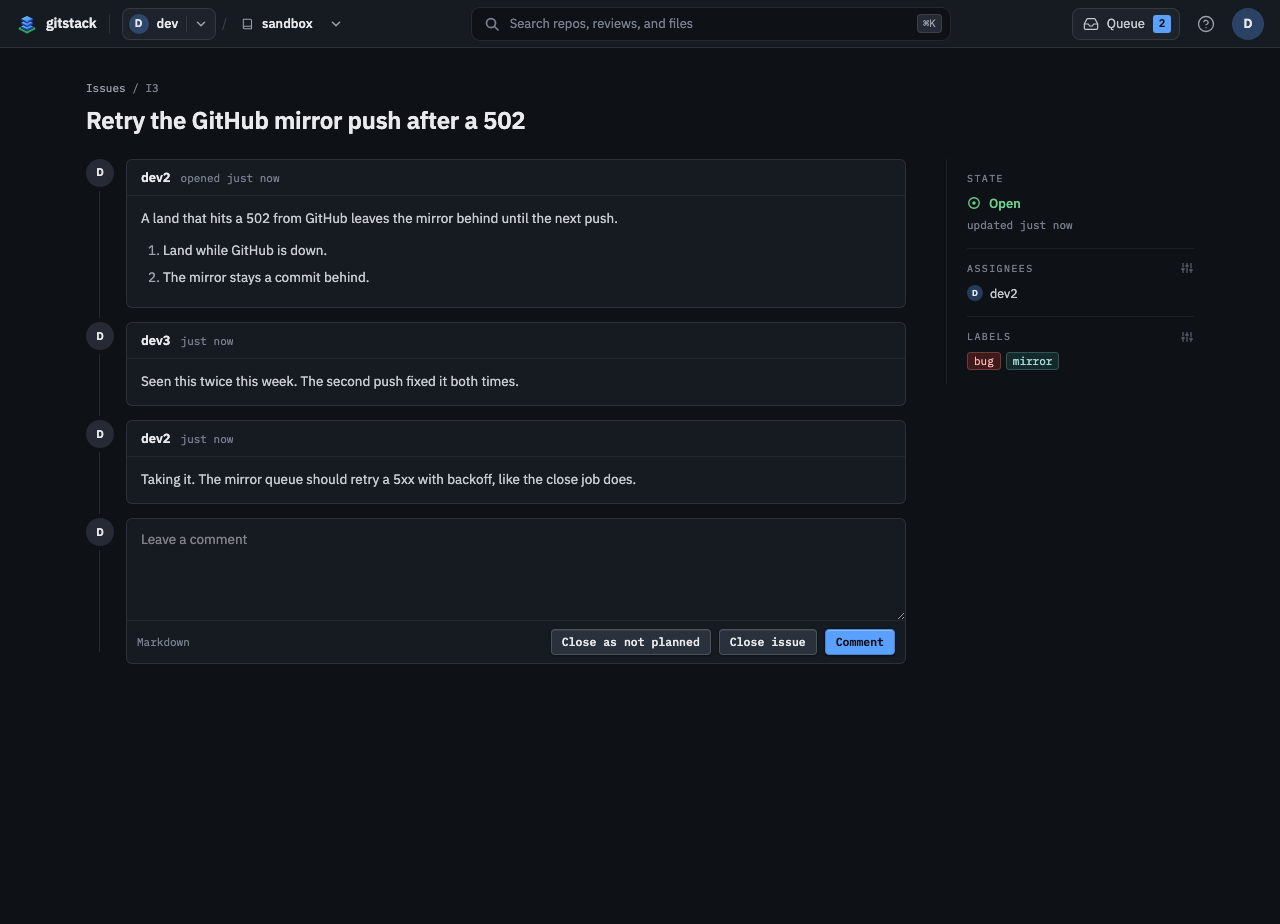
The GitStack issue I3, Retry the GitHub mirror push after a 502: the description and two comments as a chain of cards, and a rail with its state, assignee dev2 and the labels bug and mirror, each with a button to edit them.

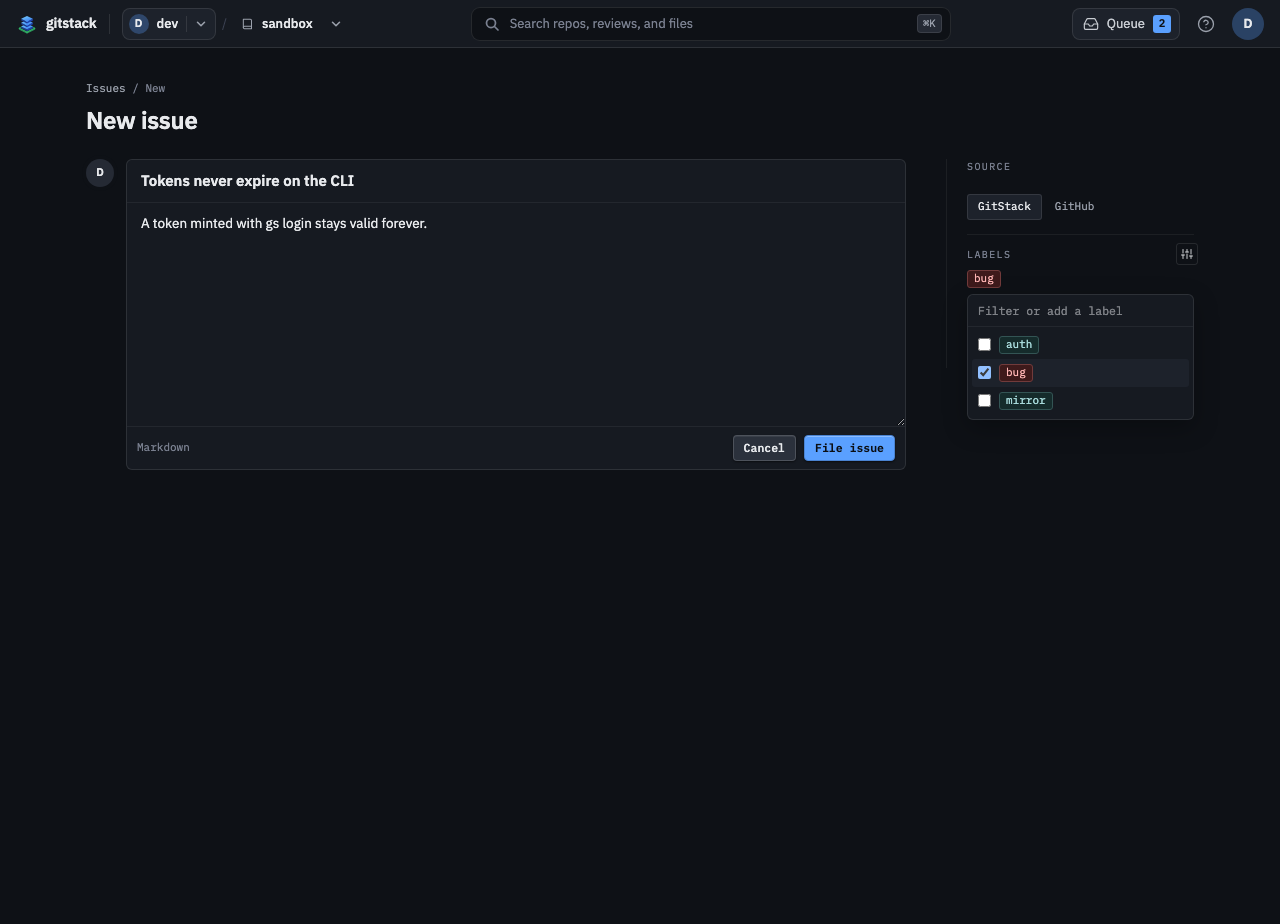
The new-issue form: a title and description, a Source picker with GitStack chosen over GitHub, and the label picker open with bug checked.

Web

Issues: colored labels, search and a side rail

The Issues list for a repo mirrored from GitHub now shows each issue's labels in the colors set on GitHub, toned to fit the light and dark themes. The Open, Closed and All tabs show their counts, and the list pages 25 issues at a time.

The Issues list on the Open tab: seven issues, each with colored labels, the author and date it was opened, a comment count and when it was last updated.

The search box matches words in the title. label:bug keeps one label (quote a label with spaces: label:"needs design"), and #12 finds one issue.

A closed issue shows a blue check when it was completed and a grey slash when it was closed as not planned.

The Closed tab in the light theme: one issue closed as not planned with a grey slash, the rest completed with blue checks.

An issue's page reads as one thread: the description first, then each comment in order, then the comment box with Close issue and Close as not planned. The side rail shows the state and when it last changed, the labels, and a link to the issue on GitHub. Times read as "2d ago"; hover one for the exact time.

An open issue: the description with a code block, four comments, the comment box, and a side rail with Open, three labels and the GitHub link.

Code blocks in issues, READMEs and stack descriptions are readable in the light theme again; their plain text had been near white.

Issues GitHub sent before today show grey labels until GitHub sends that issue again, such as on its next edit or comment.

Web

Vouch for contributors

A public repository can now take lane stacks only from people a maintainer vouched for. The list is a VOUCHED.td file in the repository, in the format of Mitchell Hashimoto's Vouch, so the same file works with Vouch's own GitHub Actions on a mirror.

Turn it on from the Vouch section of repo settings. GitStack opens one review that adds [vouch] to .gitstack/policy.toml and vouches for the people already sending you lane stacks; uncheck anyone you want to leave out. People without a vouch can still comment, which is how they ask for one.

A lane review shows its author's standing under the title. Vouch from there, with an optional reason that is kept in the file.
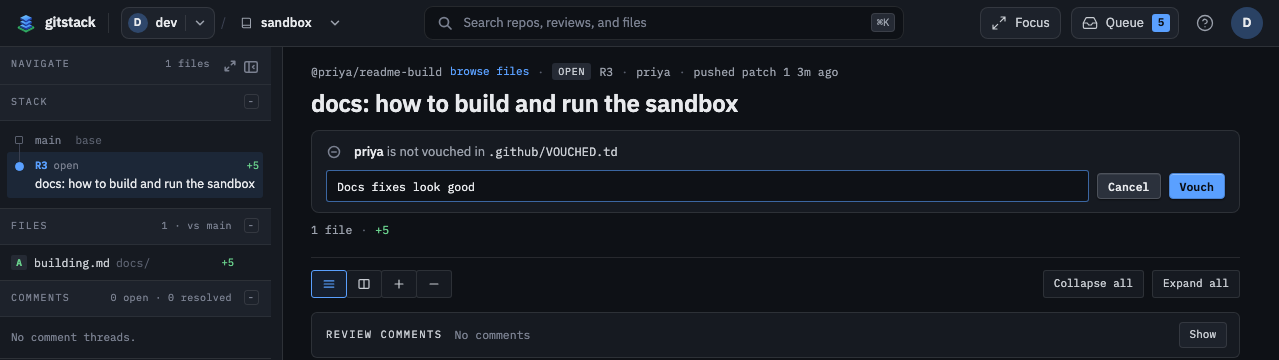
A lane review from priya, who is not vouched, with the vouch reason typed in under the title and the Vouch button ready.

Each vouch or denounce is a review that edits the file, written by the maintainer who asked and landed on its own once the repository's approval rules are met.
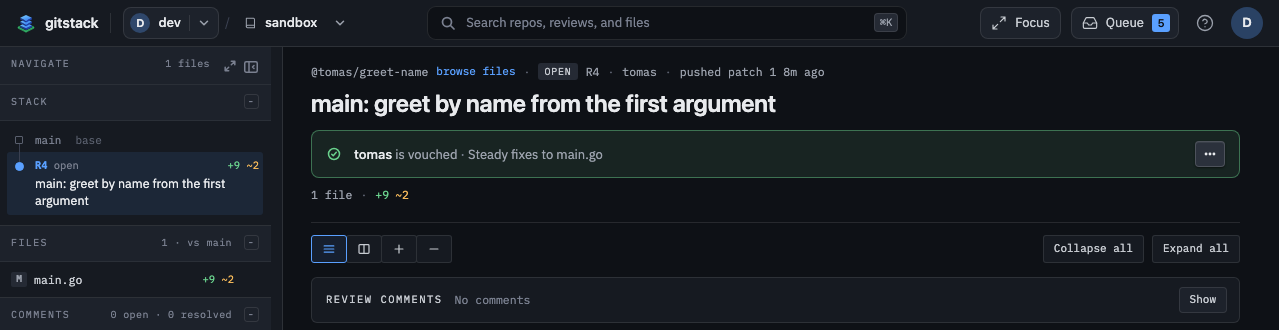
A lane review from tomas, now vouched: a green strip under the title reads tomas is vouched, with his reason.

A denounced account can't push lane stacks, comment or LGTM in the repository, and sees why before it starts typing. To share denounces between repositories on the same server, list them in denounce_from; settings shows where each imported entry came from.
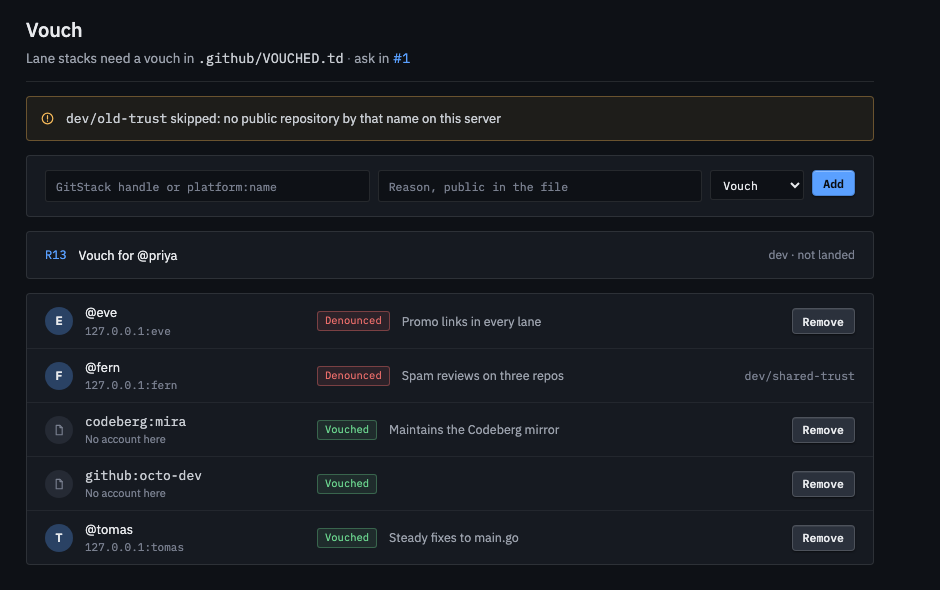
The Vouch section of repo settings: the add line, an open vouch review, and the list with two denounced accounts, one imported from dev/shared-trust, and three vouched.

From the command line, gs vouch add, denounce, remove, check and list do the same.
Vouching for contributors

1 change
Web

Sign up with a passkey or Google

  • Get started on the homepage opens the sign-up page, which offers every way to create an account: a passkey, GitHub, or Google.
  • None of them needs an invite. Invites are only needed once the service reaches its account limit.
  • One account can have several sign-in methods. Add GitHub, Google, or more passkeys under Settings, Sign-in methods.

gs 0.13.04 changes
CLI 0.13.0

gs pick, gs bisect, gs rm and gs mv

  • gs pick <rev>... applies commits from another branch onto your stack, keeping their author and message. At the top it extends the top review; at a lower review it adds the commit there and rebases the reviews above. After a conflict, resolve, gs add, then gs pick --continue or --abort.
  • gs bisect runs git bisect. While a bisect is in progress, gs commands that write or move your branch refuse until gs bisect reset.
  • gs rm and gs mv stage deletes and renames, and refuse gs's own files in .gitstack/.
CLI 0.13.0

gs review ci runs your Buildkite and webhook builds

  • gs review ci <review> now asks the repo's CI integrations (Buildkite or a webhook builder) to build the review's tip, along with GitHub Actions on a mirrored repo. It prints one line per build with its link.
  • If the tip's last build failed or was cancelled, it runs that build again and says retried. Asking again for a tip that already has a build shows it as already started instead of starting another.
CLI 0.13.0

Tag a release with gs tag

  • gs tag <name> [<rev>] makes a tag and pushes it. -m makes an annotated tag and -s a signed one, using your own git setup. gs tag -l lists tags, and gs tag -d <name> deletes one (repo owners only).
  • A tag points at a landed commit: one on the default branch or on a release branch. A commit that is only in an open review is refused, since its SHA changes on the next restack.
  • A tag cannot be moved once it exists. Delete it and make it again.
  • Tags made in GitStack are pushed to the repo's GitHub mirror, so workflows that run on a tag push start. A tag GitHub already has at another commit is never overwritten; gs repo mirror-status lists it.
WebCLI 0.13.0

Tags made on GitHub come into GitStack

  • When someone creates a tag on a mirrored repo's GitHub side, GitStack fetches it, with its commits.
  • gs repo pull-github --tags imports every tag GitStack is missing, such as ones made before this change.
  • A tag both sides have at different commits keeps GitStack's version. It shows as a conflict in gs repo mirror-status and on the repo's home page.
  • Deleting a tag on GitHub leaves it in GitStack.

gs 0.12.41 change
WebCLI 0.12.4

Mirror an existing repo to GitHub

  • gs repo mirror-github creates a private GitHub repository for a repo that already lives on GitStack, links it as the repo's mirror and pushes every branch. --owner, --name and --visibility change the defaults.
  • A repo's settings page has the same action under GitHub.
  • It never uses a GitHub repository that already exists. If the GitStack app can't reach the new one yet, install the app and run it again to finish.

1 change
Web

File names stay in view while you scroll a diff

  • On a review or a commit page, a file's header (its name, status and line counts) stays pinned to the top of the diff while you scroll through that file. The next file's header takes its place when you reach it.

gs 0.12.01 change
CLI 0.12.0

gs keeps each repo on its own server

  • gs clone and gs login remember which server a repo belongs to, so a machine signed in to several GitStack servers talks to the right one in each repo.
  • gs repo create --visibility public makes a public repo, and a refused create says why in plain words.

5 changes
Web

Add GitHub to the account you already have

  • Sign in to your account, check the page that names both accounts, and press Add GitHub.
  • Connecting GitHub for the first time asks you to sign in again if your last sign-in was more than 10 minutes ago.
  • Linking GitHub brings in its verified emails, so commits under them count on your profile.
Web

Clearer error pages

  • An expired form says to go back, reload and send it again.
  • A page that needs you signed in links to sign in and brings you back.
Web

Create a repository without GitHub

  • Accounts without GitHub see Create. Accounts with GitHub also get Create without GitHub.
  • An empty repository's page shows the gs clone command, and how to push a project you already have.
Web

Recovery codes

  • A passkey signup shows your first set. Save them, tick I saved these codes, and continue.
  • If you're locked out, pick Use a recovery code on the sign-in page, enter your handle and one of your codes, then add a new sign-in method.
  • Settings, Sign-in methods shows how many are left and makes a new set. Each code works once, and a new set replaces the old one.

7 changes
Web

Admin users pages show sign-in methods

  • The users list has a Sign-in column, Last sign-in, and a Disabled filter.
  • Every action but Enable asks you to confirm, and each asks you to sign in again if your last sign-in was more than 10 minutes ago.
Web

Choose your commit identity

  • Settings, Commit identity offers your noreply addresses and verified emails, and shows the author line as you change it.
  • Changing the email asks you to sign in again if your last sign-in was more than 10 minutes ago.
  • The default stays your GitHub noreply address when GitHub is connected, else your GitStack noreply address.
Web

Passkeys

  • Settings has a new Sign-in methods section. Name a passkey and press Add passkey, then use Sign in with passkey on the sign-in page.
  • Each method shows when it was added and last used. The last method that works can't be removed.
  • Adding or removing a method asks you to sign in again if your last sign-in was more than 10 minutes ago. Removing one signs out your other browsers.
Web

Sign in with your own OIDC provider

  • People sign in and sign up with the provider, and add it to an existing account in Settings, Sign-in methods.
  • When an action needs a recent sign-in, GitStack asks the provider to sign you in again.
  • The provider's verified emails are used to match your commits only when the operator sets GITSTACK_OIDC_TRUST_EMAILS.
Web

Sign in without GitHub

  • On a server with the GitHub App, creating or importing a repository and creating an org send an account with no GitHub to Connect GitHub first.
  • On a server without the GitHub App, Settings says so and what that turns off.
  • gitstack-server check-config lists the sign-in methods a server would offer.

2 changes
Web

New sign-in and signup pages

  • The handle field starts with your profile address, like gitstack.sh/, and turns red when a handle is taken, reserved or invalid.
  • Signup shows its two steps as a small progress bar.
Web

Pick your handle when you sign up

  • The handle field shows whether a name is free as you type.
  • It starts with your GitHub username when that name is free.
  • Existing accounts sign in as before.

gs 0.11.01 change
CLI 0.11.0

gs update

  • gs update --check says what it would install and changes nothing.
  • A gs installed with Homebrew, Scoop or a Linux package prints the command to upgrade it with that tool instead.
  • The newer-version hint and the upgrade-required error now point at gs update.
How gs update works

1 change
Web

Landed commits are authored by the review's author

  • The author's email is their GitHub noreply address when their account is connected to GitHub, else <handle>@users.noreply.gitstack.sh. This no longer depends on Post to GitHub as me.
  • Automerge lands are authored by each review's author too, and a revert made on the review page by whoever made it.
  • Commits made through the API, such as gs repo commit, use the same address, on a contributor's lane too.
  • Under a CLA, contributors can commit with their noreply address. A maintainer's noreply address no longer counts as the maintainer's.

gs 0.10.04 changes
Web

gs login asks you to approve in the browser

  • The confirm page shows the account gs will sign in as, the name the device gave itself, and when and from which IP the login started.
  • When the login started from a different network than your browser, a warning shows and Deny becomes the main button.
  • Deny ends the login, and gs stops waiting.
WebCLI 0.10.0

Outside contributors can send stacks to public repos

  • gs clone a public repository you can't write and gs submit sends your stack to your own lane, shown as @you/branch. Lanes never reach GitHub or the default clone, and they never run CI until a maintainer lands them.
  • Maintainers see new contributions in their Queue, review them like any stack, can amend them with gs checkout @handle/branch, and land them with the contributor kept as the author.
  • Add cla = "CLA.md" to .gitstack/policy.toml and a lane lands only once its contributor agrees, on the review page or with gs cla agree. The CLA shows as a check on the review.
  • Owners can hide a contributor's comments or block them from the repository. With [mirror] pull_requests = "close" in .gitstack/policy.toml, a pull request opened on the GitHub mirror is closed with a link to the guide.
Contributing through a lane
Web

Trusted proxies for self-hosted servers

  • List CIDRs, single addresses, private or cloudflare. Once set, the server reads the client address and HTTPS from a listed proxy's headers only, so per-IP rate limits count real clients.
  • Left unset, the server works as before and logs a warning at start. gitstack-server check-config shows the same warning.
  • Admin, Client IP shows the address your proxy connects from, the headers it sent, and what the server reads from them.
  • Sign-in rate limits count an IPv6 client by its /64.

gs 0.9.2gs 0.9.0gs 0.9.1gs 0.9.317 changes
WebFix

A pull request's author can't approve it in GitStack

A review synced from a GitHub pull request is recorded as written by GitStack, so the person who opened the PR could give it an LGTM that counted, and an owner or automerge could then land it on that approval. GitStack now treats the account linked to the PR author's GitHub account as the review's author when it counts approvals, before and after an eject:

  • Their LGTM doesn't count toward min_lgtms, a requested-reviewer rule, or an owner's LGTM, on the land gate, automerge, the review page, the dashboard, and gs stack.
  • They aren't offered the LGTM, and the dashboard doesn't ask them to review their own PR.
  • ?involves=<handle> in the reviews API lists the PRs they wrote.
Web

A review's commits and patch over the API

  • GET /api/v1/repos/{ns}/{name}/reviews/{id}/commits lists a patchset's commits, oldest first, with each one's subject, body, author, time and line counts.
  • GET /api/v1/repos/{ns}/{name}/reviews/{id}/patch serves the same diff the review page shows, a page of files at a time, so large reviews come through whole.
  • The review detail carries additions, deletions and changed_files.
  • A review that landed by fast-forward no longer shows an empty diff.
CLI 0.9.2

Approve a whole stack from the CLI

  • gs review approve R2 --stack approves the open reviews of R2's stack, above and below it, that you didn't write and haven't approved yet. It prints the reviews it approved.
  • If it can't approve one, it names that review and exits non-zero after approving the rest. It can't be combined with --patchset.
gs review approve
Web

Approve GitHub pull requests from GitStack

  • Approve leads the review bar on a pull request you didn't open. Once you approve its latest commits, Merge PR takes its place.
  • Request changes is in the bar's menu and asks what needs to change, since GitHub needs a comment for it.
  • Both go to GitHub as your own review, the same as one you left there. If GitStack can't use your GitHub connection, the bar asks you to reconnect GitHub and brings you back.
WebCLI 0.9.0

Comment on removed lines

  • In a review's diff, a removed line now offers the same + button as an added one, in the unified and split views.
  • gs review comment R<n> --file F --line N --side old comments on line N of the file before the change.
  • When the review is rebased, the thread moves with its line, and shows as outdated if the line itself changed.
  • Comments on removed lines in a GitHub pull request now show on the removed side.
  • gs review comments shows where each thread sits, such as main.go:6 (old).
WebFix

Comments stay put when lines are added below them

  • When a later patchset added lines right below a commented line, the comment moved down by the number of added lines and showed on the wrong code. It now stays on the line it was written on, and the lines below move down as before.
  • A comment that covers several lines now stretches over lines added inside it, instead of ending early.
Web

Commits by your other verified emails count as yours

  • Each time you sign in with GitHub, GitStack keeps the emails GitHub has verified for your account. From then on, a commit written with your work email counts on your contribution chart and names you as its author in a review's commits.
  • An email that two accounts have verified counts for neither.
  • Settings shows the list under Account. Only you can see it.
CLI 0.9.0Fix

Empty repos can take their first review

A brand-new repo has no commits on main, so the first review had nothing to stack on or land into and stopped with a raw git error. gs init now pushes an empty first commit to main, so your first review lands like any other.

For a repo made with gs repo create, run gs repo seed (or create it with --seed). Inside a clone, commits you already made on a branch move on top of the new commit. Until main has a commit, gs review create and gs stack --commits say main has no commits yet and point at gs repo seed.

gs repo seed
WebCLI 0.9.1Fix

Files with non-ASCII names show their diffs

  • A file such as cafĂ©.txt used to show up as "caf\303\251.txt" with an empty diff on the review page, in GET .../compare/{spec} and in GET .../reviews/{id}/patch. It now shows its real name and its changes, and you can comment on its lines.
  • The same goes for a file renamed to such a name, for names with a tab, a quote or a backslash, and for the conflict list a server-side rebase records.
  • gs autostack handles these files, and a --continue of gs commit, gs amend or gs sync names unresolved conflicts by their real path.
CLI 0.9.0

gs commit runs your git hooks

  • gs commit and gs amend run the repo's pre-commit, prepare-commit-msg, commit-msg and post-commit hooks, the same way git commit does, including hooks set up through core.hooksPath.
  • --no-verify (or -n) skips pre-commit and commit-msg.
  • Commits gs makes on its own, such as restacking the reviews above an edit, gs sync, gs revert and gs autostack, never run hooks.
  • A commit in the middle of a stack now refuses when tracked files have unstaged changes, since restacking the reviews above would discard them.
Git hooks
CLI 0.9.0

gs speaks JSON to scripts and links new reviews

  • Every review gs creates prints its web address on a line of its own, right after created R<n>.
  • --json now works on gs push, gs commit, gs amend and gs review create, each printing one JSON document. Under --json, a failing command prints an error object with a stable code and a hint on stderr.
  • gs push says already up to date whenever it had nothing to push.
  • gs whoami exits non-zero when you are signed out or the server rejects your token, and gs whoami --json prints your handle, server and profile.
  • gs review create and gs commit --review take --description or --description-file to describe a new stack in the same step.
JSON output and errors
CLI 0.9.3Fix

gs sync works from a checked-out review

  • gs sync from a review you checked out with gs checkout used to skip the rebase and print "already in sync", even when main had moved. It now syncs the branch and returns you to the same review on the rebased stack, still detached. gs top takes you back to the branch as before.
  • From a detached commit that is not part of the stack, or a detached HEAD on the default branch, gs sync refuses with detached_head and points at gs top.
How gs sync works
Web

Org members can approve reviews

Every member of an organization can write to its repos, but until now only the repo's creator and its collaborators could approve a review there, so a repo with min_lgtms = 1 and no collaborators had no one to approve it. An org member's LGTM now counts like a write collaborator's: toward min_lgtms, path rules, and require_requested_reviewers, and the reviewer picker offers the org's members.

Org owners and admins still are not repo owners for the policy: changes to .gitstack files and owner_lgtm paths need an LGTM from the repo's owner or an owner collaborator. Org members who are not collaborators can now also land their own reviews; the land check missed their membership before.

Feedback and approvals
Web

Review activity and an involves filter in the API

  • Every review in GET /api/v1/repos/{ns}/{name}/reviews and the review detail carries activity_at: the latest of its pushes, land or abandon, comments, replies, resolves, LGTMs, and title or reviewer edits.
  • ?sort=activity pages the list by activity_at, newest first.
  • ?involves=<handle> lists the reviews a user wrote, was asked to review, commented or replied on, or approved. It combines with the other filters and with paging.
CLI 0.9.0

Tokens for scripts and headless machines

  • gs auth token prints the token for the profile gs would use in the current directory, so tools can call the API as you without reading gs's files. --json adds the server and profile.
  • Set GS_TOKEN and GS_SERVER on a machine where gs login can't open a browser. gs uses them for API calls and for git pushes and fetches, and nothing is written to disk.
  • gs logout now removes the git credential helper its login added, and gs auth prune removes old helpers left behind for servers you no longer use. --dry-run shows what it would remove.
Tokens for scripts
Web

Withdraw an LGTM, or LGTM a whole stack, from the LGTM button

  • On a review you approved, the You gave LGTM button opens a menu with Withdraw LGTM. Repo owners find it in their stack menu.
  • LGTM all N reviews, in the same menus, gives your LGTM on every open review of the stack that you didn't write and haven't approved yet, each at its latest patchset. It shows when the stack has another review you can approve.

1 change
Web

Pinned repositories

Your home page has a Pinned section above the repository table. Choose Customize to pick up to six repositories, filter the list, and drag them into the order you want.

Each tile shows the repo's stars, open reviews and last push, plus one line of review state. Visitors see the most recently landed review. You see the open stack that needs you instead: one waiting on your review, failing CI, or ready to land.

Visitors to your profile see the pins they can read, so a private repo stays hidden from anyone without access.

1 change
Web

Sort repos by stars, and / to filter

The repository table on your home page and on org pages has a new Most stars sort. Repos linked to a public GitHub repository come first, by star count, and the rest follow by last push.

Press / to jump to the table's filter box, on the Repositories or the Reviews view. The box shows the key as a hint.

gs 0.8.11gs 0.8.123 changes
CLI 0.8.11

Change repo visibility from the CLI

gs repo visibility public or gs repo visibility private changes the visibility of a repo you own, the repo in the current directory unless you name another. It asks you to confirm first, and --force skips the question for scripts. A repo that already has that visibility is left as it is.

gs repo visibility
WebCLI 0.8.12

Revert reviews that landed by rebase

A review landed with gs submit --rebase can now be undone like any other: gs revert, the review page's Revert and the automatic revert on a red branch each undo all of its commits in one revert commit. Before, a broken rebase land had to be reverted by hand.

Web

Star counts for GitHub repos

A repo linked to a public GitHub repository now shows that repository's star count on its GitHub link, in the repo header and on the dashboard. The count updates as GitHub reports activity on the repository. Private GitHub repositories, and repositories with no stars yet, show no count.

1 change
Web

Auto-revert ignores CI setup failures

A required check can fail before it tests anything: a tool download goes down, or a runner never starts. GitStack now reads the failed GitHub Actions job's steps. A failure in an unnamed checkout, cache, actions/setup-* or oven-sh/setup-bun step, in a step named Setup: ..., or in a job that never got a runner no longer counts against the land, and GitStack re-runs the check instead. Any other failed step still does.

If setup keeps failing, the land's authors get a comment instead of a revert. A land that changes CI or toolchain files (anything under .github/, go.mod, .nvmrc, package.json, bun.lock, Dockerfile and a few more) may have broken setup itself, so its setup failures still count against it and it is reverted as before.

When a land breaks the branch

gs 0.8.55 changes
Web

Broken lands are reverted for you

A land no longer waits on CI for the commit it makes. When a land turns one of the repo's required checks red on the branch it landed into, GitStack re-runs the failed GitHub Actions jobs once to rule out a flaky test. If they fail again and the commit before the land passed, it reverts that land and lands the revert right away. The reverted review shows a Reverted strip and gets a comment naming the failing checks.

If the commit before the land has no result, GitStack re-runs CI on earlier lands until it finds the one that broke the branch. A revert is never reverted automatically, and a branch fixed forward in the meantime is left alone.

Re-running needs the GitHub App's Actions read and write permission. Until a repo's installation has it, GitStack only comments. To only ever comment, set on_red = "notify" in the [landing] table of .gitstack/policy.toml.

When a land breaks the branch
CLI 0.8.5

Edit a repo without cloning it

Changing a few files no longer means downloading the whole repository and setting up a checkout, which helps agents and quick fixes alike:

  • gs repo get downloads the files or folders you name into a folder and records the commit they came from.
  • gs repo commit sends back only the files that changed (plus new files named with --add), and the server commits them on that recorded commit. --review -t opens a review with the commit; a second commit from the same folder adds a patchset to it.
  • If the branch moved since you fetched the files, the commit is refused, so you never overwrite work you did not see.

Tests still run in CI with gs review ci. To build and test locally, use gs clone --partial.

The edit commands
WebCLI 0.8.5

History stays linear

Every land now puts commits on top of the base branch and never adds a merge commit. A review lands as one squash commit (the default) or, with --rebase, as its own commits replayed on top.

Why linear history:

  • Each commit a land puts on the base is part of a reviewed change, so git log reads as the list of landed reviews. Squash commits and replayed rebase commits name their review in a Reviewed-on: trailer, and gs review for <commit> finds the review behind any landed commit.
  • git log and git bisect step through those commits one at a time, with no merge commits to skip and no second parents to follow.
  • Undoing a squash-landed review with gs revert is one revert commit, with no parent to pick.

What changed:

  • A rebase land no longer needs gs sync after the base moved: the server replays the review's commits on top of the new base when it lands. Only a real conflict stops a land, and gs now names the conflicting files.
  • gs submit --merge is refused, and the web Land menu offers squash or rebase. A review an older gs created with --merge lands as squash, and reviews that landed with a merge commit before still revert.
  • gs submit -m sets the squash commit message of the review you submit.
  • Merging a pull request from GitStack uses squash or rebase.
How landing works
CLI 0.8.5

Partial and sparse clones

gs clone --partial downloads every commit but only the file contents the checkout needs. An older version of a file downloads from the server the first time a command needs it, such as git blame or checking out an old commit. Builds, tests and editors work as in any clone.

gs clone --sparse <folder> checks out only that folder, and the clone is partial, so other folders are not downloaded. Repeat the flag for more folders.

A plain gs clone still makes a full clone. Plain git clone --filter=blob:none works against GitStack too.

How gs clone works
CLI 0.8.5

Read a repo without cloning it

The gs repo read commands look at a repository from any directory, with no clone and nothing on disk:

  • gs repo cat prints a file and gs repo ls lists a folder.
  • gs repo search searches the code, with regular expressions and path globs.
  • gs repo symbols finds functions and types by name, and gs repo refs shows where a name is defined and used.
  • gs repo log shows history, optionally for one path.
  • gs repo diff shows what one branch or commit changes relative to another.

Each takes the repo as its first argument and accepts --json, so scripts and agents can use them directly.

The read commands

1 change
Web

Review bar: one status button and one next action

The bar at the bottom of a review now has two controls on the right: a status button and the one action that comes next.

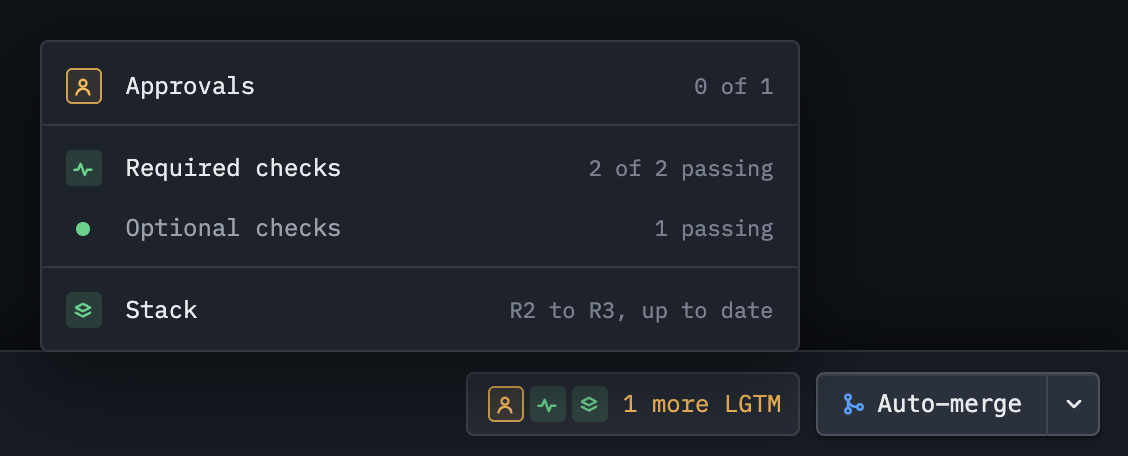
The status button shows three tiles, always in the same order: approvals, required checks, and the stack. Each tile's color is its own state, so a missing LGTM leaves passing checks green. The headline next to them names what the review is waiting on, such as "1 more LGTM" or "1 failing". Open it to see who approved, every required check, the optional checks apart from them, and the stack. A repo that asks for no LGTMs shows no approvals tile.

The status button open on a review waiting on one LGTM: approvals 0 of 1, required checks 2 of 2 passing, optional checks 1 passing, and the stack up to date.

The bar counts only required checks, from the same result that decides whether the review can land.

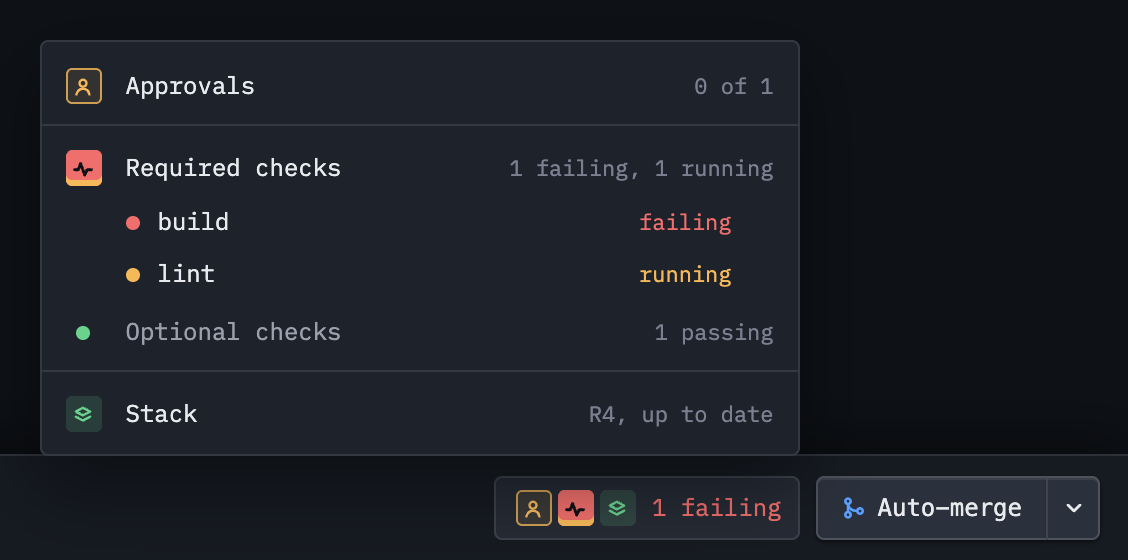
A review with a failing required check: the checks tile is red, the headline reads 1 failing, and the popover lists build failing and lint running.

The action is your next step:

  • Land N reviews when every gate is met, for anyone who can land it.
  • Run CI on a review in the middle of a stack that CI has not tested.
  • Auto-merge when what is left clears on its own, such as an LGTM or running checks. Only the author or a repo owner can turn it on.
  • LGTM for a reviewer.

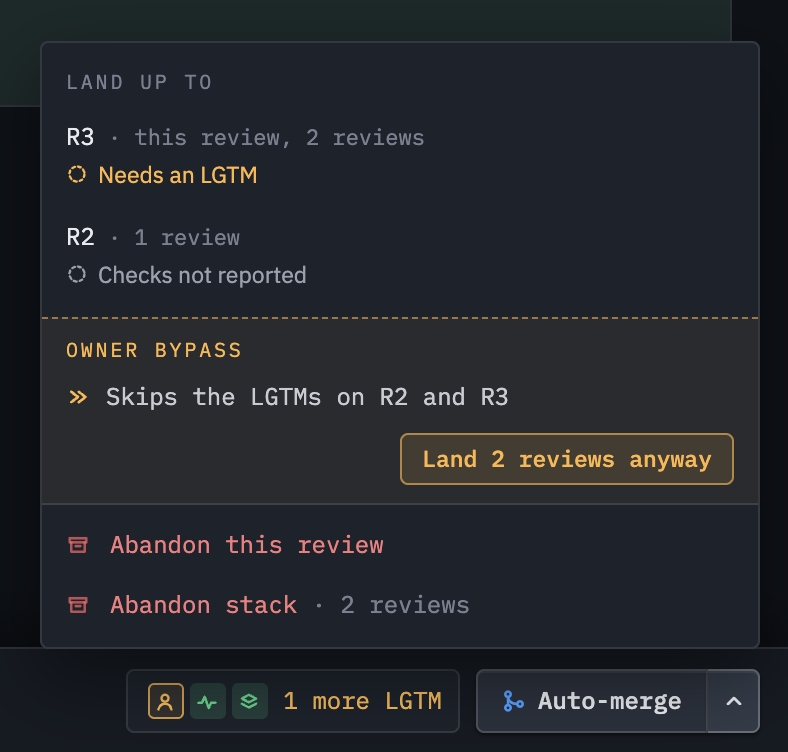
The caret next to the action opens the Land menu: land a lower part of the stack, and abandon this review or the whole stack. Repo owners can abandon a stack, and a repo owner whose policy lets them land without its LGTMs or checks finds that here too, as an Owner bypass that names what it skips.

The Land menu: each part of the stack with its state, an Owner bypass that skips the LGTMs on two reviews, and the abandon items.

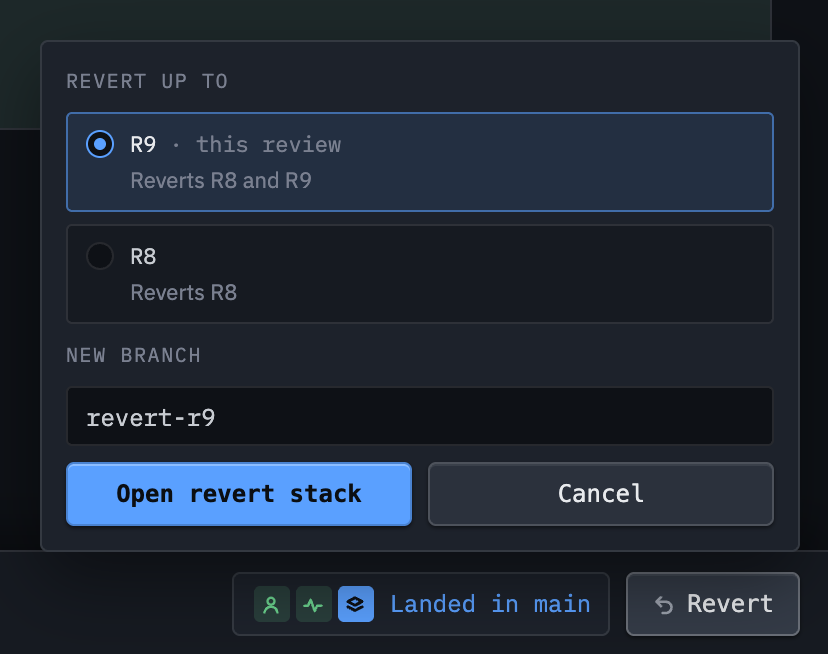
A landed review has Revert. Pick how far down the stack to revert and name the branch, and GitStack opens a revert stack you land like any other.

The Revert picker on a landed review: revert up to R9 or R8, a new branch name, and Open revert stack.

gs 0.8.33 changes
WebCLI 0.8.3

Approval rules by path

A repo used to have one approval number for every change, so a typo in the docs needed the same LGTMs as a change to billing. .gitstack/policy.toml can now set approvals by path:

toml
[approvals]
min_lgtms = 1

[[approvals.rules]]
paths = ["docs/**"]
min_lgtms = 0

[[approvals.rules]]
paths = ["src/billing/**"]
min_lgtms = 2
owner_lgtm = true

Each file a review changes takes the last rule that matches it, and files no rule matches use the top-level min_lgtms. A review needs the most that any of its files needs. gs stack, gs submit, and the review page name the rule behind the requirement, for example needs 1 more LGTM (1 of 2, src/billing/**).

How approval rules work
WebCLI 0.8.3

Find the review behind a commit

gs review for <commit> prints the review that landed a commit: its id, title, status, and link. It takes a full or short SHA, or anything git resolves, such as HEAD~2 or a tag, and --json prints the same as JSON. It works for every commit a land brought in, including the middle commits of a rebase land.

Commits that GitStack creates when it lands a review, such as squash and merge commits, now end with a Reviewed-on: line that links to the review. The commit page and the code browser's last-change bar name the review for any landed commit as well.

How gs review for works
Web

Land from the review page and stay there

The Land button on a review page used to dim the panel for a few seconds with no sign of progress, then move you to another page. Now you stay on the review while it lands. The confirm button shows a spinner, and once the land is done the review reads "Landed in main".

When the land takes the whole stack, the panel also offers Delete branch, checked by default. It deletes the branch on GitStack, and on GitHub too when the repo mirrors there. A branch with commits no review covers is kept, and the review bar says why. Your local branch stays until you run gs cleanup.

How cleanup works

1 change
Web

Contribution chart on your profile

Your profile has a contribution chart. Each day counts your pushes, your reviews that landed, and the approvals you gave, in every repo the viewer can see. Days follow your own time zone.

It starts as a compact bar with your year at a glance: the grid and your current streak, and on a wide screen your best day, your longest streak, your busiest day of the week, and your gold days. Click the bar to open the full chart, and click it again to fold it away. Your browser remembers which you prefer.

  • Gold days are your biggest days, measured against your own previous year, so a day that turns gold stays gold.
  • Streaks are five or more weekdays in a row. Weekends never break one.
  • Comebacks mark the day you are back after two weeks or more off.

Hover a label or a pattern to light up the days it describes. Drag the timeline under the chart to look back, and watch the card's glow grow as your current streak runs longer.

gs 0.8.21 change
CLI 0.8.2

Push with local changes left out

gs push refuses when the working tree has uncommitted or untracked changes, because a forgotten gs commit is the usual cause. When the leftovers are meant to stay local, such as scratch files, a build artifact, or an edit you are not ready to commit, pass --allow-dirty. The commits push and everything else stays in your working tree. The refusal now names the flag.

gs review create, gs review split, gs review fold, and gs commit --review take the same flag for the push they make.

How gs push works

gs 0.8.03 changes
CLI 0.8.0

Automerge from the gs CLI

Automerge used to be a button on the review page. gs can now turn it on as well. Pass --automerge to gs review create or gs commit --review, or run gs stack automerge on on a stack you already have. gs stack automerge off turns it off, and gs stack shows automerge on while it is on.

With automerge on, GitStack lands the whole stack as soon as every review is approved and CI is green. It turns on once the whole stack is pushed, so a stack you are still carving never lands halfway.

WebFix

Landed stacks show all their reviews

Cleaning up a fully landed stack deletes its branch, and with it the record the review page used to draw the Stack rail. Opening any of its reviews showed only that review, and the others were reachable only from the small links in the landed line under the title.

The rail now lists every review that landed as part of the stack, base first, each marked landed. That includes a stack landed in several batches.

2 changes
Web

Comment on a range of lines

Press a line's + in a review diff and drag up or down to pick the lines you want to comment on. Releasing opens the comment box on that span, a plain click still comments on one line, shift-click extends the selection, and Escape cancels. The posted thread sits under the last line it covers and marks the whole span, and the Comments rail labels it with the range, like main.go:3-6.

Clicking into any thread now highlights the lines it is about, and clicking anywhere on a thread's header folds or unfolds it. The comment box and thread cards were also restyled to match the rest of the app.

Range comments work on native reviews. Reviews synced from a GitHub pull request keep single-line comments, since GitHub takes one line per inline comment. From the CLI, gs review comment --line N:M already makes the same range comments.

Web

Reviews on your dashboard

The three queue cards at the top of your dashboard are gone. The table under your name now switches between Repositories and Reviews, and Reviews shows one row per stack across every repo you work in.

Filter it to what you need right now:

  • Needs you: stacks waiting on your review, ready for you to land, or failing CI.
  • Mine: your own stacks.
  • Waiting: your stacks blocked on someone else's review.
  • All open: every open stack in your repos.
  • Landed: stacks that landed in the last 14 days.

Each row names the repo, shows the stack's top review with the same status chip as the repo page (CI is the color, approval is the fill) over what it waits on, and has the button for the next step: land it, review it, or check the failing run. Hover a stack's title to see the whole stack, the same card the repo page shows, right next to your pointer. The dashboard opens on Repositories, and the "need you" count under your name opens Reviews. The top bar's queue badge now counts stacks, so it matches that count.

GitHub pull requests stay in your queue until you approve them, even after GitHub stops listing you as a requested reviewer. To change that, open Settings and pick how long they stay under Queue: until you approve, until the author responds, or only while GitHub requests you.

gs 0.7.35 changes
WebCLI 0.7.3Fix

GitStack never overwrites a branch changed on GitHub

GitStack only updates a branch on GitHub when GitHub is missing it or still has the commit GitStack last pushed there. If someone moved the branch on GitHub directly, for example rolling a deploy branch back, every push to GitHub refuses instead of overwriting it.

gs repo resync-github lists the branches it skipped. To pick a side:

  • Keep GitHub's version: gs repo pull-github --force <branch>
  • Keep GitStack's version: gs repo resync-github --force <branch>
How resync decides
CLI 0.7.3Fix

mirror-status checks GitHub directly

gs repo mirror-status used to judge each branch only by what gs had pushed to GitHub, so a branch pushed to GitHub some other way read as missing. It now compares against GitHub's real branches:

  • ok: GitHub and GitStack match, including branches updated on GitHub.
  • missing or stale: GitHub is missing the branch or still has an older commit gs pushed. gs repo resync-github fixes these.
  • moved: someone changed the branch on GitHub directly. gs leaves it alone and shows how to keep either side.
  • managed: the branch is GitHub-managed (see policy.toml).
mirror-status states
Web

Preview Markdown files in reviews

Each Markdown file in a review diff now has a Diff / Preview switch in its header. Preview renders the file as it stands at the review's tip, with relative links and images pointing at that commit. A deleted file previews the version it had before.

Also fixed: a Markdown file or comment with a task list (- [x]) skipped code highlighting, and files skipped resolving their relative links. Both now work with task lists present.

WebCLI 0.7.3

Pull from GitHub, and let GitHub own a branch

gs repo pull-github brings GitHub's branches into GitStack. It fast-forwards by default; --force <branch> takes GitHub's version of a branch the two sides disagree on, and --dry-run shows the plan. It never overwrites the default branch or a branch with open reviews. Repo owners and admins can run it.

For a branch GitHub owns, such as a deploy branch a script pushes to GitHub, add it to .gitstack/policy.toml:

toml
[mirror]
github_managed = ["production"]

GitStack then follows GitHub's version of that branch, rollbacks included, never pushes it, refuses pushes and lands into it, and never prunes it. The default branch can't be GitHub-managed.

The policy.toml reference
WebFix

SVGs with embedded fonts now render

Some drawing tools, Excalidraw among them, put the font an SVG uses inside the file itself. GitStack's SVG safety check treated that embedded font as an outside link, so those images did not render in review diff previews, READMEs, or the file viewer.

Fonts and raster images embedded in the file are now allowed, and the SVG renders with its own font. Links to anything outside the file are still blocked.

gs 0.7.24 changes
CLI 0.7.2Fix

A landed branch's leftover stack data no longer blocks commits

After a stack landed, gs could keep that branch's stack data in .gitstack/branch-reviews.json. On the next branch, gs commit refused and told you to delete the file yourself.

Now gs commit, gs amend, gs push, gs review create, and gs switch check with the server first. If every review in the leftover data has landed or been abandoned, gs clears it and carries on. Stack data that was never pushed is still kept, and gs tells you to run gs switch <branch> && gs push to publish it.

CLI 0.7.2Fix

gs add stages .gitstack config files

gs keeps its own bookkeeping in .gitstack/ and tells git to ignore it. It used to ignore the whole directory, which also hid a new policy.toml, checks.toml, or owners.toml, so gs add refused to stage it.

Now only the bookkeeping is ignored. Config files show up in git status, and gs add .gitstack/policy.toml stages them like any other file, even in a repo whose own .gitignore lists /.gitstack/. Existing clones switch to the new rule the next time gs writes its bookkeeping.

CLI 0.7.2

gs branch can list remote branches

gs branch still lists your local branches by default. Two new flags match git's:

  • gs branch -r lists remote-tracking branches, such as origin/main.
  • gs branch -a lists local branches first, then remote ones.

A remote row shows its review count when this clone has that branch's stack, and remote otherwise. Run gs fetch first to see the latest remote branches.

Web

Vivid color palette

GitStack now has a second color palette. Vivid gives surfaces a cool blue tint, makes accents and status colors stronger, and uses a more colorful syntax palette in code views and diffs.

The palette is its own choice, separate from dark or light, so there are four looks. Switch it from the Palette row in the account menu, or from the Theme row in Settings. Default looks exactly as it did before.

gs 0.7.12 changes
Web

Global search finds more of what you type

The search in the top bar got a round of matching fixes:

  • Repos, reviews, and files match your words in any order, and dashes, slashes, and underscores no longer get in the way.
  • Files also match when the letters of your query appear in order, ranked after closer matches.
  • A query naming a repo puts that repo first.
  • path/to/file.go:42 opens the file at line 42.
  • app R12 (or alice/app R12, or app#R12) jumps to review R12 in that repo.
  • Opening an empty search box lists the repos and reviews you opened recently in this browser.
CLI 0.7.1Fix

Retargeted stacks sync cleanly

A stack built on main and then retargeted to a release branch still holds main's commits locally. gs 0.7.0 counted those commits as work that only existed on your machine, so gs sync refused to adopt the server's rebase, and gs cleanup and the branch reset after a land refused too.

gs 0.7.1 knows commits that are already on main or on the stack's base are safe on the server, and judges only the stack's own commits.

bash
brew upgrade alethi-dev/tap/gs

gs 0.7.01 change
WebCLI 0.7.0

Stacks can land into any branch

A stack used to land into the repo's default branch, always. Now each stack has its own base, so you can carry a fix on release/1.x the same way you work on main.

Name the base on the stack's first review. Later reviews inherit it, gs submit lands into it, gs sync restacks onto it, and gs stack prints lands into release/1.x.

bash
gs worktree add hotfix --base origin/release/1.x
gs review create --base release/1.x -t "fix: release crash"

To move a stack you already have, retarget it on the server, then adopt the result locally:

bash
gs review rebase --stack --onto release/1.x
gs sync

On the web, the new-review popover on a repo's home page has an "into" picker that records the base the same way.

Every machine that touches a stack with a base needs gs 0.7.0 or newer. An older gs stops with unknown field "base"; upgrade with brew upgrade alethi-dev/tap/gs.

Retargeting in the docs

2 changes
Web

Landing policy in repo settings

Repo settings now has a Landing policy section. It shows what every land needs and lets you edit it:

  • how many LGTMs a review needs,
  • whether requested reviewers must approve,
  • whether repo owners can land without approval,
  • which checks must pass.

Policy lives in .gitstack/policy.toml, so the form doesn't change it directly. Saving proposes the change as a review on the settings/policy branch, and it takes effect when a repo owner approves and lands that review. Policy changes get reviewed like code.

policy.toml reference
Web

Org members page

Each org has a members page at /<org>/-/members. It lists every member with their role and join date, and you can search, sort, and switch between All, Owners, Admins, and Members.

The org home also shows the first 10 members, with a link to the full list. Both are visible to the org's members and to site admins.

1 change
Web

Every stack in a repo on one page

The Open stacks list on a repo's home page stops at 10. Every stack now has a home on the Stacks page at /<namespace>/<repo>/stacks.

It has tabs for open, landed, and abandoned stacks, and filters for open ones: Mine, Needs my review, Ready to land, Blocked, and Stale (no push in 7 days). You can search, sort by last update, creation, or size, and page through the results. Each row shows the stack's status, reviews, approvals, and open threads, and the list refreshes as people push.

1 change
Web

A new top bar with global search

Every page now has the same 48px top bar:

  • Search (Cmd K, or Ctrl K off a Mac) finds repos, reviews, and files. Typing a page name like settings, billing, or stacks jumps straight there.
  • Switchers next to the logo move between your namespaces and their repos.
  • Queue shows what is waiting on you, grouped by why.
  • The help and account menus hold docs, feedback, theme, and settings.